How do I download a video from Vimeo?
Vimeo hands the download decision to whoever uploaded the video, which makes the first question not how to save one but whether the person who made it has already said yes.
- Guide
- How-to
- Read
- 13 min
- Language
- English
Steps checked against the Savvy Android app on
Devikon Research Team
Which Vimeo links resolve, and which never will
Vimeo has a more elaborate privacy ladder than most platforms, and where a video sits on it decides everything. It is worth knowing the rungs, because they explain almost every failure people run into.
Public videos live at vimeo.com/ followed by a string of digits. That numeric address is the whole link. A public video is an ordinary public page, and a downloader reads it the way anyone can.
Unlisted videos with a private link add a second segment — a hash after the number. They do not appear in search or on a profile, but the link itself is the key, and anyone holding it can watch. Whether you should keep a copy is a question about who gave you the link and why, rather than a technical one.
Password-protected videos stop at the password. Vimeo does not serve the media until the password is accepted, so there is nothing for an extractor to find on the page — it meets a form, exactly as your browser does. No app changes that.
Domain-restricted and embed-only videos are the ones that confuse people most. The uploader has told Vimeo the video may only play when embedded on a particular site. Open the vimeo.com address directly and Vimeo declines, because the conditions the uploader set are not met. Again, that refusal happens at Vimeo's end.
Vimeo On Demand and OTT titles are a paid product with DRM on the playback. Those are out of scope here and will stay out of scope: buying access to a title is not the same as being handed a file, and nothing on this site is going to describe otherwise. Watch purchases in Vimeo's own apps, which handle offline viewing for them properly.
- vimeo.com/123456789 — a public video, the straightforward case
- vimeo.com/123456789/a1b2c3d4e5 — unlisted, reachable by whoever holds the link
- player.vimeo.com/video/123456789 — the embed address, which is recognised too
- Password-protected — the media is never served until the password clears; nothing to read
- Embed-only or domain-restricted — Vimeo refuses playback outside the site the uploader named
- Vimeo On Demand — a DRM-protected purchase, and not something this guide covers
The pattern across all of those: the restriction lives at Vimeo, not in the downloader. If a video does not play for you in a browser, an app reading the same page meets the same refusal. Anything advertising a way past a password or a domain lock is describing something that does not work.
Getting the link into the app
Assuming a public or private-link video and a reason to have a copy, there are two routes in and they are not equally quick.
Use Vimeo's share control and pick Savvy from the system share sheet. The link is handed over and the download starts on its own — the field fills itself and the fetch begins without another tap.
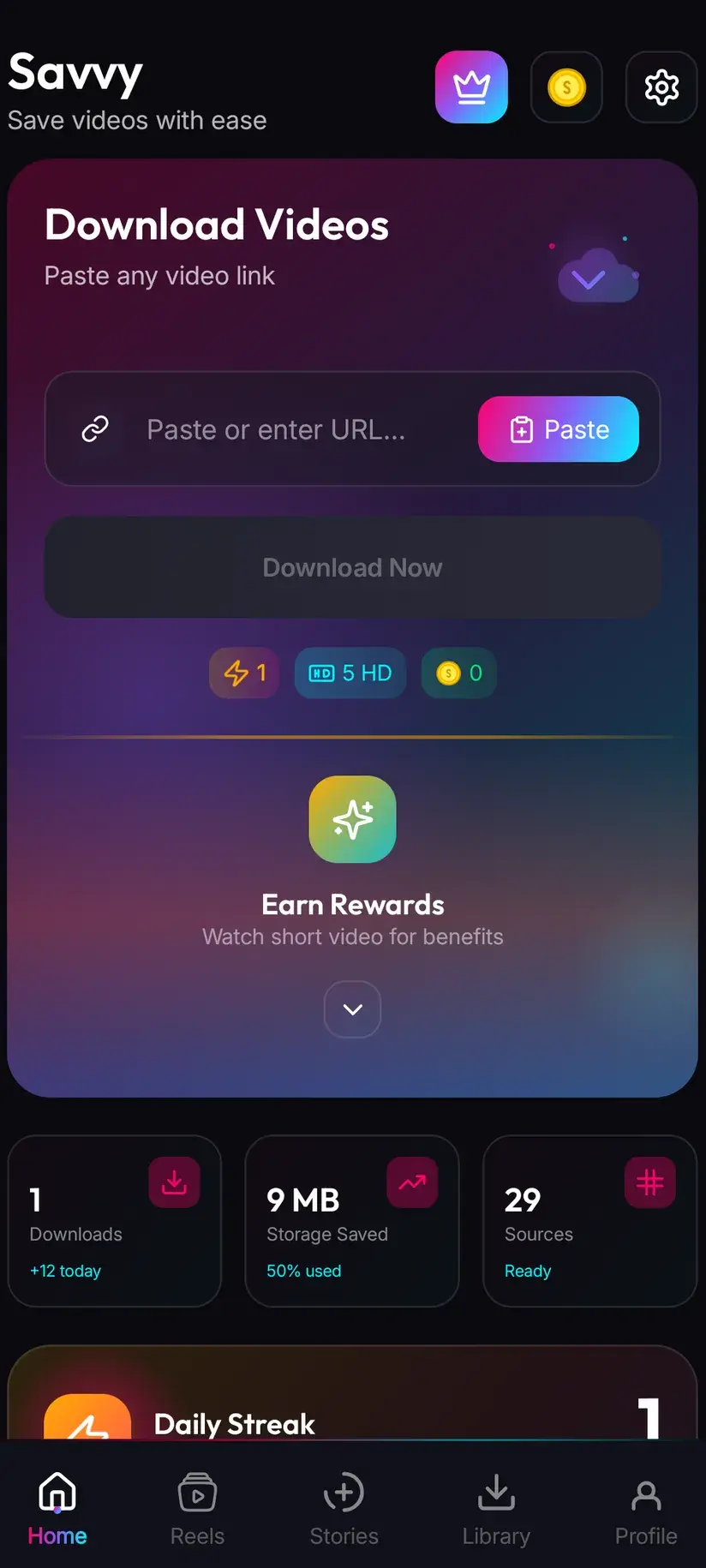
The other way is copy-and-paste, and the middle step deserves saying precisely because a good many downloader apps imply something else. Copy the link, open Savvy, tap the Paste button beside the link field, then tap Download. Savvy does not watch your clipboard in the background and does not start anything when you switch to it. Paste is an ordinary button: it reads the clipboard once, checks the link is a shape it recognises, and fills the field. Nothing else happens until you tap Download.
One Vimeo-specific detail. If you found the video embedded on somebody's site, the address in your browser bar is that site, not Vimeo. Right-clicking the player usually offers a way to the Vimeo page, and the player.vimeo.com address the embed itself uses is recognised as well. What will not work is the surrounding page's URL, since there is no Vimeo video behind it as far as a link is concerned.
- Share to Savvy — link filled and download started automatically
- Copy link, then Paste — tap Paste to fill the field, then tap Download yourself
- An embedded player's own player.vimeo.com address works; the host page's address does not
- If Paste turns the link away, you have probably copied a profile, a channel or a showcase rather than a single video
Vimeo has the deepest fallback chain of any platform covered in this batch: a link is tried against four extraction providers in priority order, each attempted automatically if the one before comes back empty. You see one spinner rather than four tries — which also means that when a link does fail, it has already been through all four, so retrying immediately rarely helps.
Quality: the platform where paying for more actually buys more
Elsewhere in this cluster the advice is to be sceptical of high quality tiers, because most social platforms re-encode uploads hard enough that a bigger file is just a bigger file. Vimeo is the exception, and it is worth saying so.
Vimeo built its reputation on treating video properly. It has long accepted high-resolution masters, it is where a great deal of professional work is published, and 2K and 4K uploads are genuinely common rather than theoretical. So when the quality picker offers a higher tier here, there is a reasonable chance the detail is actually present in the source.
The rule underneath has not changed — downloading cannot add detail that was never uploaded — but on Vimeo the detail is more often there. The practical test is the same one as everywhere: look at what the picker lists after the link resolves. If 4K is offered, the source has it. If the ceiling is 1080p, that is the ceiling, and no setting raises it.
Frame rate and bitrate are the other half of the story and matter as much as resolution on graded, cinematic footage. Our 1080p vs 4K explainer goes through why a well-encoded 1080p file frequently looks better than a starved 4K one.
What it costs
After a link resolves, Savvy shows the qualities that video is genuinely available in and lets you pick. Standard definition, up to 480p, is free — it draws on a daily allowance rather than any balance.
Above 480p the cost is in coins, Savvy's in-app currency. On Vimeo the upper tiers see more use than elsewhere, for the reason set out above, so it is worth knowing the whole ladder rather than just the free rung.
- SD video, up to 480p — free, from your daily allowance
- HD and Full HD video — 10 coins, or one HD credit if you have one
- 2K video — 15 coins
- 4K video — 20 coins
- Images and audio — 5 coins
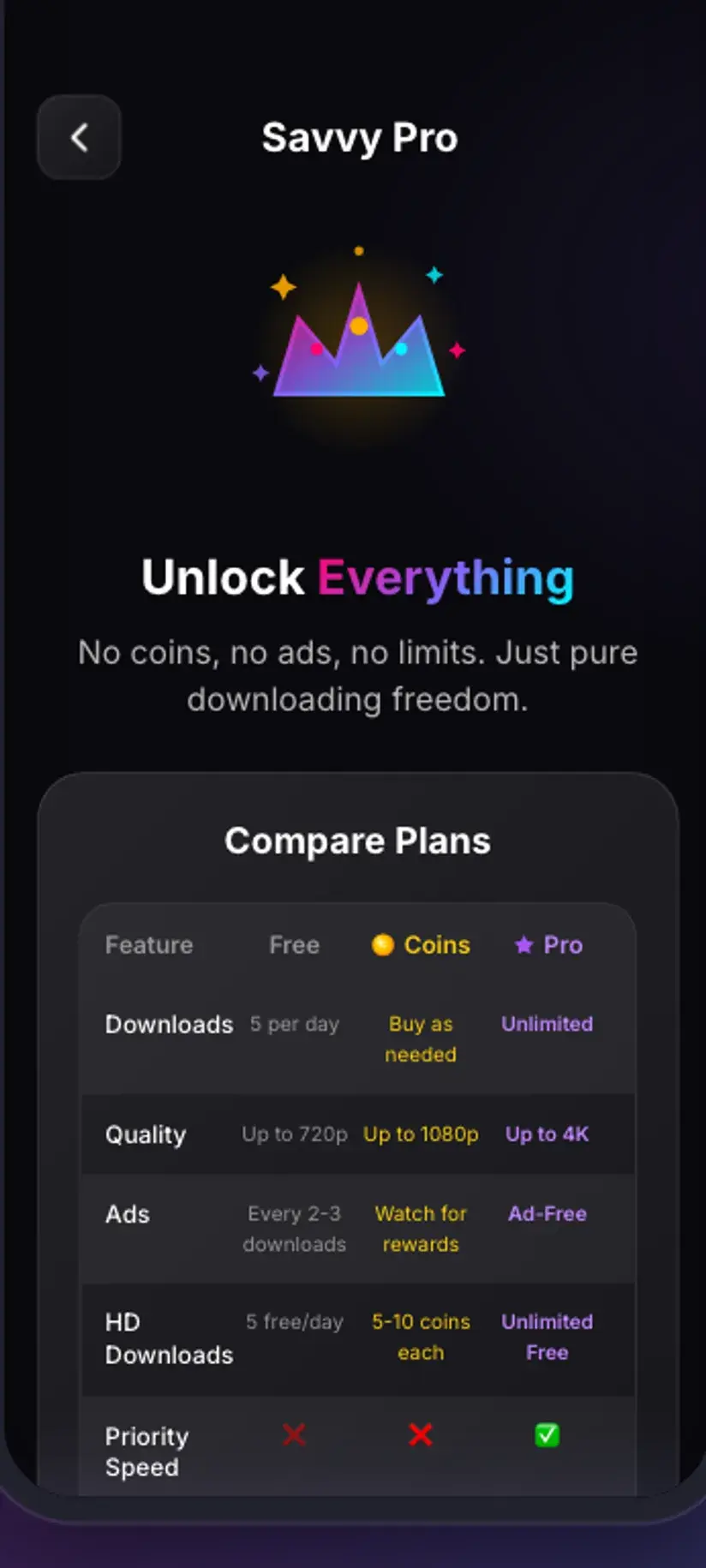
Coins are earned as well as bought — a short rewarded ad or a daily check-in both add to the balance, and the Coin Shop lists those routes next to the packs. Premium removes ads and lifts the download limits, which is the sensible option if you are routinely pulling 4K. The free tier is ad-supported through Unity Ads, which collects your device's advertising ID; that is set out in the Savvy privacy policy.
Rights, on a platform full of people's livelihoods
The rights framing matters more here than on a platform of casual clips, and it is worth being direct about why.
Vimeo is where showreels, client deliverables, documentary work, wedding films, festival submissions and agency portfolios live. A large share of what is on it is somebody's professional work, uploaded to be seen rather than to be taken. Some of it is under an active client agreement, and a fair amount arrived in your hands as a private review link precisely because it was not meant to circulate.
So the question to ask is not whether a file is reachable. It is what you are entitled to do with it. Keeping your own work, a deliverable you commissioned and paid for, something explicitly licensed to you, or a public video you want to watch on a flight is ordinary. Passing a private cut onward, reusing footage in your own edit, or republishing a filmmaker's work is a rights question and has nothing to do with which app fetched the file.
Savvy does not add a watermark of its own, and Vimeo does not stamp one on the video — the logo you see belongs to the player, not the file. What does travel with a download is anything the creator burned in themselves: a logo bumper, a lower third, a review-copy overlay with a burnt-in timecode. Those are pixels in the frame. A visible draft watermark is also a fairly strong signal about whether the copy was meant to leave the room it was sent to.
Being able to download something is not the same as having rights to it, and on a platform of commissioned work that gap is wider than usual. Is downloading videos legal? sets out where the line generally falls.
Where the file ends up
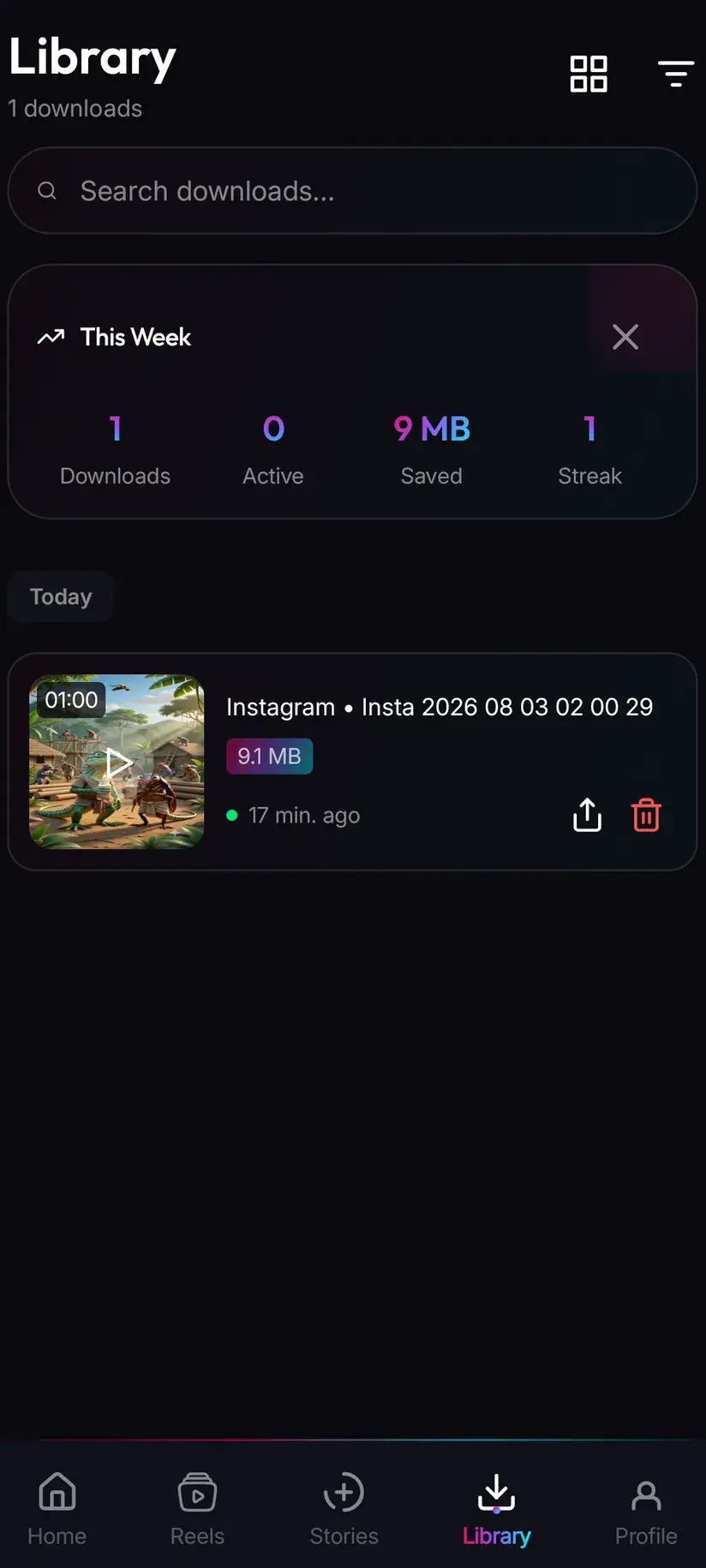
Finished downloads land in your device's Downloads folder, in a Savvy directory sorted by platform — so a Vimeo video goes to Downloads / Savvy / Vimeo. It is an ordinary MP4 from there: it appears in your gallery, plays in any video app, and shares onward like any other file.
Inside the app, Library is the faster route back, with search and filters. Storage is its companion and earns its keep on this platform in particular: Vimeo files are frequently large, and a handful of 4K downloads will make a noticeable dent in a phone. It shows what each one costs in space and lets you clear several at once.
The downloaded files stay on the device. Savvy holds your coin balance and subscription state on its own servers, because those have to survive a reinstall, but nothing you have saved goes anywhere.
Procedure
How to download a video from Vimeo
Check the uploader's own Download control first — where it exists it is free, permitted, and often gives a better file than anything else can. These steps cover a public or private-link video with no such control.
Look for the uploader's Download control
Open the video page on Vimeo and look under or beside the player. If a Download option is present, the uploader has enabled it deliberately — use it. It costs nothing and frequently offers a choice of resolutions or the original file.
Check the video is one you can reach
Open the link in a browser. A public or private-link video plays; a password-protected, embed-only or domain-restricted video does not, and nothing can read what Vimeo has not served. Vimeo On Demand purchases are DRM-protected and are not covered here.
Install Savvy and allow storage access
Install Savvy from Google Play and open it. Grant the storage permission when asked — that is what lets a finished download be written somewhere your gallery can see rather than staying inside the app.
Send the link to Savvy
Use Vimeo's share control and pick Savvy from the system share sheet. The link is handed over and the download starts on its own. If Savvy is not offered, copy the link instead and continue with the next step.
If you copied instead, tap Paste and then Download
Open Savvy and tap the Paste button beside the link field. That fills the field and checks the shape is one the app recognises — it does not start anything. Tap Download afterwards to begin. Include the private-link hash if the address has one.
Choose a quality, then check Library
Savvy lists the qualities that video is genuinely available in, and on Vimeo the higher tiers are often real rather than nominal. SD up to 480p is free; HD and above spend coins. When it finishes, the file is in Downloads/Savvy/Vimeo and listed under Library inside the app.
Frequently asked questions
- How do I download a video from Vimeo?
- Look for the uploader's own Download control on the video page first — whether a video can be downloaded is a per-video setting they control, and where it is switched on the file is free, permitted, and often better quality than anything else could give you. Where it is absent, and you have a reason to keep a copy, use Vimeo's share control to send the link to Savvy, which starts the download on its own. Or copy the link, tap Paste in Savvy, then tap Download.
- Why is there no download button on a Vimeo video?
- Because the uploader turned it off, or never turned it on. Vimeo makes downloading a per-video setting rather than a platform-wide policy, so its absence is a decision a specific person made about a specific video — and two videos on the same account can differ. If the video is yours, the toggle is in your own video settings and switching it on gives everyone with the link a clean route to the file.
- Can I download a password-protected Vimeo video?
- No. Vimeo does not serve the video at all until the password is accepted, so there is nothing on the page for anything to read — an extractor meets the same password form your browser does. The same applies to embed-only and domain-restricted videos, where Vimeo refuses playback outside the site the uploader named. Those restrictions live at Vimeo, not in the downloader, and no app changes them.
- Can I download a Vimeo On Demand film I paid for?
- Not through a downloader. Vimeo On Demand and OTT titles are a paid product with DRM on the playback, and this guide does not cover getting round that. Watch purchases in Vimeo's own apps, which handle offline viewing for them properly. Paying for access to a title is a different thing from being handed a file, and the distinction is deliberate on Vimeo's part.
- Can I download an unlisted Vimeo video someone sent me?
- Technically yes — an unlisted video has a private link with a hash after the number, and the link itself is the key, so anyone holding it can watch and a downloader can read the same page. The real question is not technical. Private links are usually sent because the video was not meant to circulate, especially on a platform full of client work and review cuts. Whether you should keep a copy depends on who sent it and why.
- Is downloading Vimeo videos in 4K worth the coins?
- More often than on most platforms, yes. Vimeo has long accepted high-resolution masters and is where a great deal of professional work is published, so 2K and 4K sources are genuinely common rather than nominal. 4K costs 20 coins, 2K costs 15, HD and Full HD cost 10 or one HD credit, and SD up to 480p is free from a daily allowance. The test is the picker itself: it lists what that video actually has, and downloading cannot add detail that was never uploaded.
- Will a downloaded Vimeo video have a watermark?
- Savvy adds none, and Vimeo does not stamp the video — the logo you see belongs to the player rather than the file. What does travel with the download is anything the creator burned in themselves: a logo bumper, a lower third, or a review-copy overlay with a burnt-in timecode. Those are pixels in the frame and cannot be removed by downloading differently. A visible draft watermark is also a strong hint that the copy was not meant to travel.
- Where do downloaded Vimeo videos save on my phone?
- In your device's Downloads folder, under a Savvy directory sorted by platform, so Vimeo video lands in Downloads/Savvy/Vimeo. From there it is an ordinary MP4 that appears in your gallery and plays anywhere. Inside Savvy, Library lists everything with search and filters, and Storage shows what each file takes up — worth using on this platform in particular, since a few 4K downloads make a real dent in a phone.