How to check mutation (Dakhil Kharij) status online
Banglarbhumi has two mutation status screens with almost the same name. They answer different questions, and most people are sent to the wrong one.
- Guide
- How-to
- Read
- 9 min
- Language
- English · বাংলা
Portal steps checked against banglarbhumi.gov.in on
Devikon Research Team
The two screens, and which one you want
This trips up almost everyone, and no guide covers it clearly. Banglarbhumi has two mutation status lookups with nearly identical names, sitting in different menus with different access rules.
Mutation Case Status is the case-number lookup. Give it a case or application number and it tells you where that application has reached. This is the one you want if you simply need to track a case — and it works whoever filed it, including a mutation lodged over the counter at the BL&LRO rather than online.
Mutation Status, under Online Service Status, is the account-holder's own view. That whole menu is tied to your account and lists the applications *you* submitted through the portal. It is the right screen if you applied online yourself and want your own submissions listed — but it is not the way to track a bare case number, and it will not help at all if the mutation was filed at the office rather than through your portal account.
Have your banglarbhumi.gov.in sign-in ready either way. The portal's record lookups need a signed-in session, and it does not say so up front: the District and Block dropdowns populate perfectly well while you are signed out, so the requirement only surfaces when you press search. Sign in before you start rather than discovering it halfway through.
- Mutation Case Status — search any case by its case or application number
- Mutation Status (under Online Service Status) — your own online applications, tied to your account
- Mutation Plot Khatian Status also exists under Online Service Status. It concerns the Khatian and plot outcome of a mutation rather than the case's progress
If you have a case number, Mutation Case Status is the screen you want — Online Service Status answers a different question. And if the portal shows “Please Login and then click Citizen Services” or drops you at a sign-in form, that is the sign-in requirement rather than evidence you picked the wrong menu. Sign in and carry on.
What Dakhil Kharij actually is
Mutation — Dakhil Kharij in Bengali usage — is the step where the land records are updated to show the new holder after a transfer. Registering a deed and mutating the record are two different acts by two different offices, and this is the most consequential misunderstanding in West Bengal land transactions.
Registration records that a transfer happened. Mutation updates the revenue record so the department bills, recognises and lists you as the holder. A registered deed with no mutation leaves the Khatian still showing the seller, which is exactly how a plot you bought years ago still comes back under someone else's name in a Banglarbhumi search.
Mutation is also required after inheritance, where it usually follows a succession or Warish process, and after a partition among co-sharers.
Until the mutation is disposed of and published, the Khatian search will keep showing the previous holder. That is not an error in the record and it is not something a re-search will fix — the case has to complete.
What you need before you look it up
The status lookup is keyed on the case, not on you, so the number is the thing that matters. Without it the screen cannot help, however well you are signed in.
Your case or application number will be on the acknowledgement you were given when the application was filed — the receipt from the BL&LRO office, or the confirmation from an online submission. Keep it: it is the only key you have.
- The mutation case / application number, copied exactly including any year or office prefix and any leading zeros
- The District and Block the land sits in, since the lookup narrows by office
- Your Mouza name and JL number, useful for cross-checking the Khatian afterwards
Reading the result: the shape of a mutation case
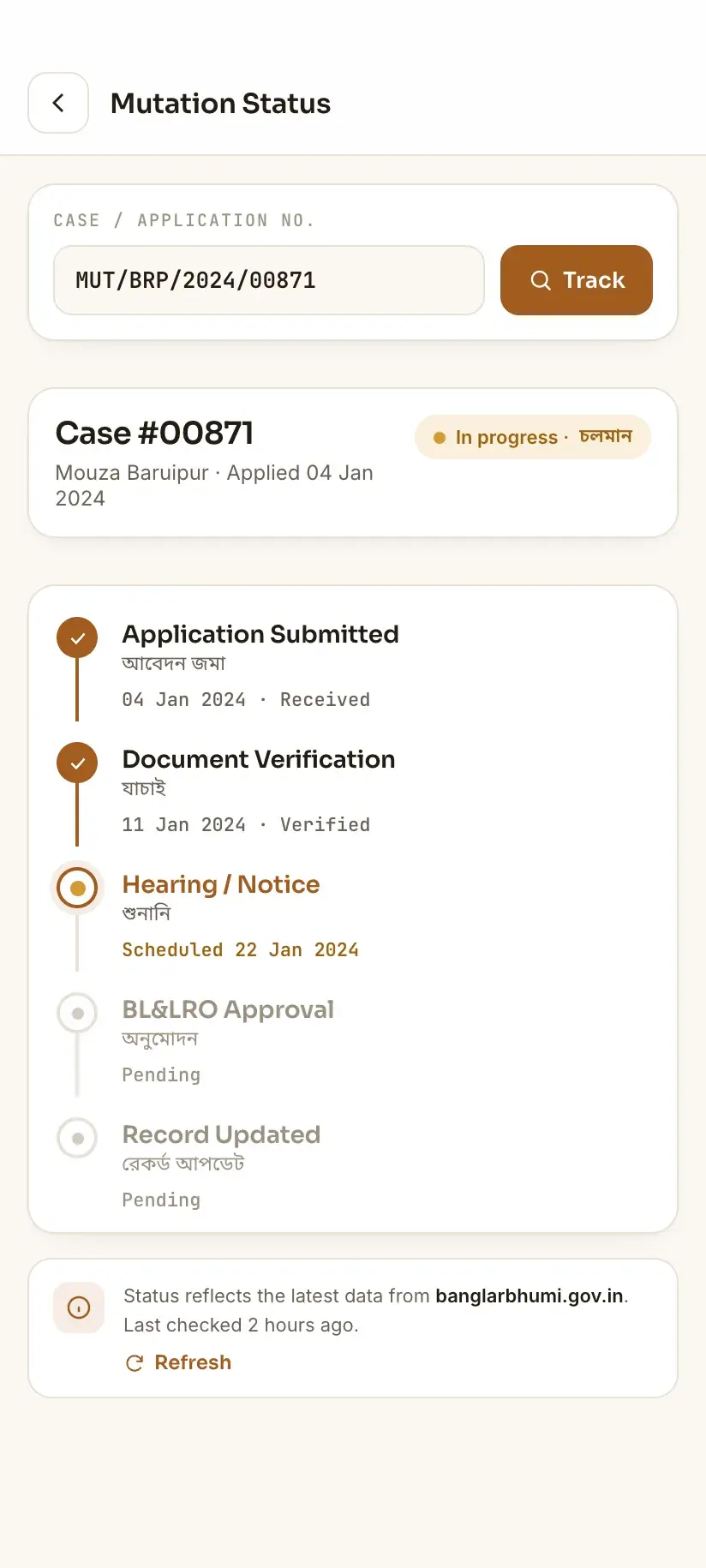
The status screen reports where the case has reached in the office's workflow. Rather than memorising an exact list of stage names — which vary in wording and are not worth guessing at — it is more useful to understand the shape the process takes, because that tells you what a given status implies about the wait ahead.
Broadly, a mutation case moves through three phases. It is received and recorded at the office, which is when the case number becomes searchable. It is then examined — documents checked, and where the law requires it, notice given to interested parties so objections can be raised and heard. Finally it is decided, and if allowed, the record is corrected and the updated Khatian published.
Two practical consequences follow. First, the middle phase is where a case can sit longest, because it may depend on a notice period or on someone else responding. Second, a case can show as decided before the updated Khatian appears in a record search, since publishing the corrected record is a separate step from ordering it.
- A status that names a receiving or recording stage means the file exists but has not yet been worked
- A status that names examination, notice, hearing or objection means the case is live and may be waiting on a period or a party, not on an officer
- A status indicating disposal means a decision has been made — check the Khatian itself, and allow for the record update to follow
- A status indicating rejection or return means something was missing or contested; the office can tell you what, and it usually needs a fresh or corrected filing
The status hasn't moved in weeks
This is the most common reason people search for mutation status a second time, and it is worth separating the causes before assuming neglect.
The most frequent is simply that the case is in a phase that has a waiting period built into it. A notice or objection window is time that has to pass; nothing in the record will change while it does.
The second is a document gap. If something submitted was illegible, unsigned, or inconsistent with the deed, the file stalls quietly and often without any online signal. Only the office can tell you this, and it is the single most valuable question to ask when you visit.
The third is a contested case. If an objection was filed, the case moves at the pace of a hearing rather than a queue.
The fourth is not a stall at all — a mis-typed case number returns nothing, or returns someone else's case, and people read that as no progress. Check the number character by character against your acknowledgement, including leading zeros and any prefix, before concluding anything.
When you do go to the BL&LRO, take the acknowledgement, the registered deed, your identity document, and any khajna receipts. Ask specifically whether the file is awaiting a document from you — that answer resolves a large share of apparently stalled cases.
After the mutation is allowed
A decided case is not the end of the sequence. Two things are worth doing once the status shows disposal.
Check the record itself through the Know Your Property search, using the Mouza and your Khatian or Dag number. The name, share and area should now reflect the new holding. If they do not, allow for the publication step, then ask the office — a mutation ordered but not reflected is a records question, not a re-application.
Then check the plot-level outcome. Mutation frequently changes the Khatian structure rather than just a name: a plot may be split between holders, or a new Khatian created. The portal exposes Mutation Plot Khatian Status under Online Service Status for this, which lists it against your own applications; a plot search through Know Your Property or RS-LR Plot Information shows the resulting position for any holding, whoever filed the case. Both routes want you signed in.
Doing this repeatedly, and where an app helps
Mutation cases take time, so checking status is rarely a one-off. On the portal each check means re-selecting the location dropdowns and clearing a fresh CAPTCHA — the CAPTCHA is issued per search, not per session — which is a lot of friction for a lookup you may repeat weekly for months.
Bhumir Tathya is our own app — free, unofficial, Android — and it presents these lookups as native screens in Bengali and English, keeping records you have already viewed readable offline. It does not bypass any government authentication and cannot: it signs in with your own banglarbhumi.gov.in account, so you need one exactly as you would on the site. What it removes is the repetition, not the requirement.
Procedure
How to check mutation case status on Banglarbhumi
Two or three minutes once you are signed in to your Banglarbhumi account and have the case number in front of you.
Find your case number
Take out the acknowledgement or receipt from when the mutation was filed and copy the case or application number exactly, including any prefix and leading zeros.
Sign in and open Mutation Case Status
Go to banglarbhumi.gov.in, sign in, then choose Mutation Case Status. Do not choose Mutation Status under Online Service Status — that screen lists your own online applications rather than looking up a case by its number.
Select the location
Choose the District and Block the land sits in, so the lookup queries the right office.
Enter the case number and CAPTCHA
Type the case number exactly as written on your acknowledgement, complete the CAPTCHA, and search. Refresh an unreadable CAPTCHA rather than guessing — a wrong one is sometimes reported as an unrelated error.
Read the stage the case has reached
Work out which phase it sits in: received and recorded, under examination or notice, or disposed of. A case in an examination or notice phase may be waiting on a period rather than on an officer.
Check the Khatian if the case is disposed
Open Know Your Property and search your Mouza and Khatian or Dag number. The updated name, share and area should appear once the corrected record has been published.
Go to the BL&LRO if nothing has moved
If the status is unchanged over several weeks, visit the Block Land & Land Reforms Office with your acknowledgement, deed and identity document, and ask directly whether the file is waiting on a document from you.
Frequently asked questions
- How do I check mutation status on Banglarbhumi without logging in?
- Expect to sign in. Banglarbhumi's record lookups need a signed-in banglarbhumi.gov.in account, and the portal does not warn you in advance — the District and Block dropdowns fill in while you are signed out, so it looks open until you press search. Sign in first, choose **Mutation Case Status**, select the District and Block, enter your mutation case or application number, complete the CAPTCHA and search. Registering is free: see [registering on Banglarbhumi](/wb-land-records/banglarbhumi-registration/).
- What is the difference between Mutation Case Status and Mutation Status?
- They are two different screens answering two different questions. Mutation Case Status looks up any case by its case or application number, whoever filed it — this is the one most people want, including when the mutation was lodged at the BL&LRO rather than online. Mutation Status sits under Online Service Status and lists the applications submitted through your own portal account. If you have a case number, use Mutation Case Status; you will want to be signed in for either.
- What is Dakhil Kharij and is it the same as registration?
- No, and the difference matters. Registration records that a transfer took place. Dakhil Kharij, or mutation, updates the land record so the department recognises you as the holder. A registered deed with no mutation leaves the Khatian showing the seller — which is why a plot bought years ago can still come back under someone else's name in a Banglarbhumi search.
- My mutation status has not changed for weeks. What should I do?
- First verify the case number character by character against your acknowledgement — a mis-typed number returns nothing and reads as no progress. If the number is right, the case may be in a phase with a built-in notice or objection period, or it may be stalled on a document the office needs from you. Only the BL&LRO can tell you which, so visit with your acknowledgement, deed and identity document and ask directly whether anything is pending from your side.
- The mutation is complete but the Khatian still shows the old owner. Why?
- Publishing the corrected record is a separate step from ordering the mutation, so there is normally a gap between a case showing as disposed and the record search reflecting it. Re-check Know Your Property after a short interval. If the record still has not changed, raise it with the BL&LRO as a records question — it does not need a fresh mutation application.
In Bengali
মিউটেশন (দাখিল খারিজ) স্ট্যাটাস দেখার নিয়ম — বাংলায়
পশ্চিমবঙ্গের বাংলারভূমি পোর্টালে মিউটেশন কেসের অবস্থা দেখতে হলে নিজের অ্যাকাউন্টে **লগইন করে নেওয়া দরকার**। এছাড়া প্রায় একই নামের দুটি আলাদা স্ক্রিন আছে — সঠিকটি বেছে নেওয়া জরুরি।
- মিউটেশন স্ট্যাটাস কীভাবে দেখব, লগইন কি লাগবে?
- লগইন করে নিন। বাংলারভূমিতে রেকর্ড দেখতে হলে অ্যাকাউন্টে লগইন করতে হয় — জেলা ও ব্লকের ড্রপডাউন লগইন ছাড়াও কাজ করে বলে প্রথমে বোঝা যায় না, সার্চ করলে তবেই লগইন পাতা আসে। তাই আগে **SIGN IN** করুন, তারপর ‘Mutation Case Status’ বেছে জেলা ও ব্লক বাছুন, কেস বা আবেদন নম্বর দিয়ে CAPTCHA লিখে সার্চ করুন। অ্যাকাউন্ট খুলতে টাকা লাগে না।
- ‘Mutation Case Status’ আর ‘Mutation Status’ — পার্থক্য কী?
- ‘Mutation Case Status’ কেস নম্বর দিয়ে যে কোনও কেসের অবস্থা দেখায় — কেসটি অনলাইনে হোক বা BL&LRO অফিসে জমা পড়ুক। ‘Mutation Status’ থাকে ‘Online Service Status’ মেনুতে, সেখানে শুধু আপনার নিজের অনলাইন আবেদনগুলির তালিকা দেখা যায়। কেস নম্বর থাকলে প্রথমটিই ব্যবহার করুন; দুটির ক্ষেত্রেই লগইন করে নেওয়া ভালো।
- দাখিল খারিজ কি দলিল রেজিস্ট্রির মতোই?
- না। রেজিস্ট্রি হল হস্তান্তরের নথিভুক্তি, আর দাখিল খারিজ (মিউটেশন) হল জমির রেকর্ডে নতুন মালিকের নাম তোলা। মিউটেশন না হলে খতিয়ানে বিক্রেতার নামই থেকে যায় — তাই দলিল হয়ে গেলেও আলাদা করে মিউটেশন করাতে হয়।
Related guides
- How to search a Khatian online in West Bengal
- Khatian not found on Banglarbhumi — what it actually means
- Banglarbhumi login not working — what to try
- Mouza map download in West Bengal — the honest version
- Deed search in West Bengal — what it proves, and what it doesn't
- How to apply for mutation (Dakhil Kharij) online in West Bengal
- Filing and tracking a grievance on Banglarbhumi