How to search a Khatian online in West Bengal
Two things stand between you and a Khatian: being signed in to a Banglarbhumi account, and pointing the search at the right Mouza. Neither is obvious until it stops you.
- Guide
- How-to
- Read
- 10 min
- Language
- English · বাংলা
Portal steps checked against banglarbhumi.gov.in on
Devikon Research Team
Sign in first — the portal will make you anyway
Looking up a Khatian means being signed in to a banglarbhumi.gov.in account. Use the portal's SIGN IN control before you start the search rather than after, and the reason is worth understanding, because the portal does not warn you.
Signed out, everything looks open. Know Your Property loads normally. The District, Block and Mouza dropdowns populate one after another exactly as they would if you were signed in — the cascade is not broken and it is not a trick, it genuinely works. Nothing on screen suggests you are missing anything.
The stop comes at the last step. Ask the portal for the actual record and it answers with its login page instead of a result. So the sequence people fall into is: pick three dropdowns, choose a record generation, type in a Khatian number, solve a CAPTCHA, press search — and arrive at a sign-in form with all of it gone. Expect to sign in before you see anything, and do it at the start.
Two screens cover almost every lookup people want:
- Know Your Property — the main search. Narrow down to a Mouza, then search by Khatian number or by Plot (Dag) number
- RS-LR Plot Information — plot-centred lookup across the RS and LR record generations
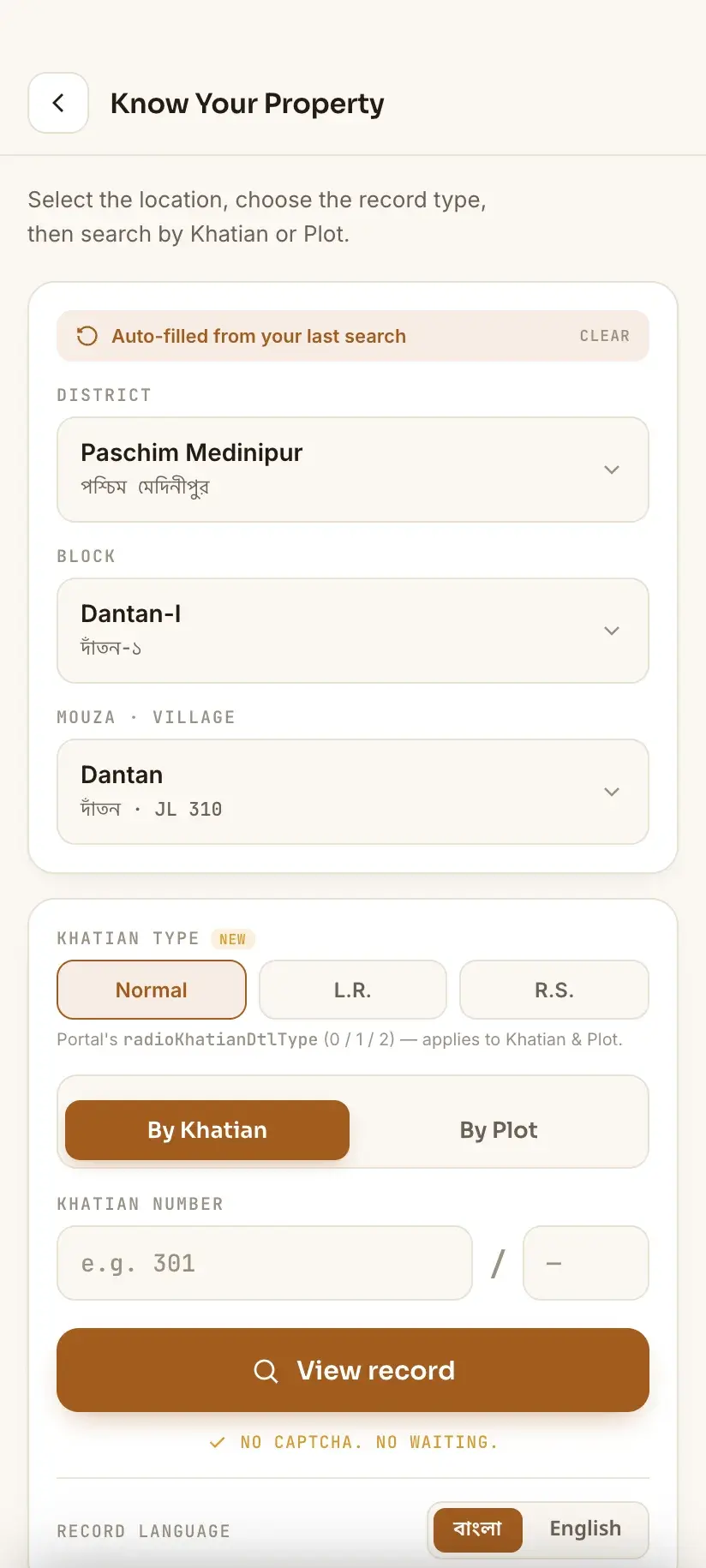
The account is free to create and is the same one used for everything else on the portal — see [registering on Banglarbhumi](/wb-land-records/banglarbhumi-registration/). Fees are a separate gate behind the sign-in: applications, khajna payment, ROR Request and Mouza Map Request are chargeable, while a record lookup is not.
Why the search asks for District, Block and Mouza first
The dropdown chain is not bureaucratic padding. It exists because a Khatian number on its own is meaningless — Khatian numbers are only unique within a single Mouza. Khatian 247 exists in hundreds of Mouzas across West Bengal, and they have nothing to do with one another.
So the portal makes you name the Mouza before it will accept a number. District narrows to Block, Block narrows the Mouza list, and only then does the Khatian or Dag field become useful.
The trap is that Mouza names repeat, heavily. Adjacent Blocks routinely hold similarly named Mouzas, and English transliteration produces several spellings of the same Bengali name. This is where the JL number (Jurisdiction List number) matters: it identifies a Mouza unambiguously within its police station (thana) area — which is why official notices always quote the P.S. alongside it, and it is what tells two near-identical dropdown entries apart.
- Find the JL number on any parcha, deed, mutation order or khajna receipt you already hold — it is normally printed beside the Mouza name
- Match the JL number, not the spelling
- The portal's Mouza Information service lists Mouzas with their JL numbers for a chosen District and Block, if you need to confirm one
- A wrong Block silently restricts the Mouza list to the wrong set — check it before blaming the Khatian number
- 01District23 in West Bengal
- 02BlockBL&LRO office sits here
- 03Mouzaidentified by its J.L. number
- 04Khatianunique only inside the Mouza
- 05Dag (plot)unique only inside the Mouza
Searching by Khatian number vs by Dag number
Know Your Property accepts either, and which you choose depends on what you are trying to establish.
Search by Khatian number when you want to see a holding — everything one person or group holds in that Mouza. A Khatian is the record of a holder's land, so the result is owner-oriented: it lists the plots that belong to that Khatian.
Search by Dag (plot) number when you want to see a specific piece of ground — who holds it and in what shares. A Dag is the surveyed plot, so the result is land-oriented. This is the search to use when you are looking at land you might buy, or checking a boundary neighbour.
The two are linked: one Khatian usually spans several Dags, and one Dag is often shared between several Khatians. If a Dag search returns multiple holders, that is normal — it means the plot is jointly held, not that the record is wrong.
What the result actually shows you
A successful lookup returns the record as the department holds it. Exactly which columns appear varies a little between the Khatian view and the plot view, but the substance is consistent:
- Owner / holder name, usually with the father's or husband's name as a disambiguator
- Share — the fraction of the plot attached to that holder, which is what tells you whether the land is solely or jointly held
- Area — the recorded extent of the plot, in the units the record was written in
- Classification — the recorded land character (agricultural, homestead and so on), which is what a conversion application exists to change
- The linked Khatian and Dag numbers, letting you pivot from one to the other
This is a record of what the department has published, not a title certificate. It reflects mutations that have been disposed of and published — a pending Dakhil Kharij will not show, so a recently sold plot can still display the previous holder. Check Mutation Case Status before drawing conclusions from an unexpected name.
RS or LR? Search both if you are unsure
West Bengal has more than one generation of survey records, and they do not share numbering. The two you meet on the portal are RS (Revisional Settlement) and LR (Land Reforms). Know Your Property asks you to pick one; RS-LR Plot Information is built around the distinction.
A Khatian number taken from an RS parcha will frequently return nothing against LR records, because LR re-numbered everything during its own survey. The record is there; the number simply does not mean the same thing in the other generation.
The same applies to plot numbers, under different names: sabek dag is the older number, hal dag the current one after resurvey. They do not map one to one — a sabek dag is often split across several hal dags. Documents more than roughly two decades old usually carry sabek numbers — matching sabek to hal covers how people actually do it.
If you do not know which generation your paperwork belongs to, run the search twice. It costs two minutes and resolves a large share of empty results.
Searching by owner name, and why it disappoints
People reach for the name search first and it is the least reliable route on the portal. Understanding why saves a lot of frustration.
Records were digitised from handwritten registers, so the stored spelling is whatever the operator read. Bengali names transliterate several ways into English — Mondal, Mandal, Mondol; Chowdhury, Choudhury, Chaudhuri; Sk, Sekh, Sheikh — and the record may hold a form you would never think to type. Add initials, honorifics, and the father's-name-versus-own-name ordering, and an exact-match search on a full name will often miss a record that is sitting right there.
There is a second reason: inherited land frequently remains unmutated for decades, so the name in the record may be a grandparent's rather than yours.
- Prefer Khatian or Dag numbers wherever you have them — numbers survive digitisation far better than names
- Try the surname alone before the full name
- Try the Bengali spelling as well as the English one, where the field accepts it
- Consider that the record may still stand in an ancestor's name
The CAPTCHA, and doing this repeatedly
Every search on the portal is gated by a CAPTCHA, and it is issued per search rather than per session. Checking one Khatian is a minor annoyance; checking eight plots in a Mouza means eight CAPTCHAs, each of which can fail on a distorted character and send you back to re-enter the dropdowns.
This is the single biggest reason people abandon the portal midway. If you are doing more than a couple of lookups, work through them in one sitting with the District/Block/Mouza already selected, and refresh an unreadable CAPTCHA rather than guessing at it — a wrong CAPTCHA is sometimes reported as an unrelated error.
Alternatives exist for the reading side of this, and one of them is ours — weigh it accordingly. Bhumir Tathya is a free, unofficial Android app built by Devikon that presents these same lookups as native screens — bilingual Bengali and English, and records you have already viewed stay readable offline. It does not and cannot bypass any government authentication: it signs in with your own banglarbhumi.gov.in account, so you still need one. What it changes is the repetition, not the requirement.
Procedure
How to search a Khatian on Banglarbhumi
About five minutes for a first lookup, once you are signed in. Have your banglarbhumi.gov.in details to hand before you start.
Note your Mouza and JL number first
Before opening the portal, find the Mouza name and its JL number on any parcha, deed, mutation order or khajna receipt you hold. Write down the Khatian or Dag number too.
Sign in, then open Know Your Property
Go to banglarbhumi.gov.in and sign in first — the search will bounce you to the login page at the final step otherwise, losing everything you typed. Then choose Know Your Property from Citizen Services, or RS-LR Plot Information if you are working from a plot number and want to compare record generations.
Select District, then Block, then Mouza
Work down the chain in that order — each dropdown filters the next. Confirm the Mouza against your JL number rather than against the spelling of its name.
Choose the record generation
Pick RS or LR according to which your document belongs to. If you do not know, pick one now and repeat the search with the other afterwards.
Enter the Khatian number or the Dag number
Search by Khatian number to see a holder's whole holding, or by Dag number to see who holds one specific plot. Use the number search rather than the name search wherever you can.
Complete the CAPTCHA and search
Type the CAPTCHA exactly as shown, refreshing it if any character is ambiguous. Expect a fresh CAPTCHA for every subsequent search.
Read the result, then cross-check
Check the owner name, share, area and classification. If the name is unfamiliar, verify you used the right numbering generation before assuming anything — and check Mutation Case Status for a pending case that would explain a stale name.
Frequently asked questions
- How do I check my Khatian online in West Bengal?
- Open banglarbhumi.gov.in and sign in to your account, then choose Know Your Property and select your District, Block and Mouza in that order. Enter your Khatian number, complete the CAPTCHA and search. No payment is involved in a lookup, but you do have to be signed in — the portal redirects you to its login page at the moment you request the record. You can search by Dag (plot) number instead if you want to see who holds a particular piece of land.
- Can I search a Khatian without logging in to Banglarbhumi?
- No. You will need to be signed in to a banglarbhumi.gov.in account before the portal returns a record. What makes people think otherwise is that Know Your Property opens signed out and the District, Block and Mouza dropdowns fill in perfectly normally — the redirect to sign-in only happens at the final step, when you actually ask for the record. Signing up is free; fees are a separate matter, and [what the portal charges for](/wb-land-records/banglarbhumi-fees/) sets out where they apply.
- Why does the search ask for a Mouza before the Khatian number?
- Because Khatian numbers are only unique within a Mouza. The same Khatian number exists in hundreds of Mouzas across West Bengal, so the number means nothing until the Mouza is fixed. Since Mouza names repeat and transliterate several ways, match the JL number rather than the spelling — Mouza Information lists Mouzas with their JL numbers for a chosen Block.
- What is the difference between searching by Khatian and by Dag number?
- A Khatian is a holder's record, so a Khatian search shows everything that holder owns in that Mouza. A Dag is a surveyed plot, so a Dag search shows who holds that specific piece of land and in what shares. One Khatian usually covers several Dags, and one Dag is often shared between several Khatians — multiple names on a plot search normally means joint ownership rather than an error.
- Can I find land by owner name on Banglarbhumi?
- Where the search offers it, yes, but it is the least reliable route. Records were digitised from handwritten registers, so a Bengali name may be stored in a transliteration you would not think to type — Mondal against Mandal, Sekh against Sheikh. Try the surname alone, try the Bengali spelling, and remember that inherited land often still stands in an ancestor's name. Search by Khatian or Dag number whenever you have one.
- Is there a way to avoid entering a CAPTCHA for every search?
- Not on the portal itself — the CAPTCHA is issued per search, not per session. Bhumir Tathya — which we build — is a free, unofficial Android app that presents the same lookups in Bengali and English, and keeps records you have already viewed available offline. It does not remove the portal's CAPTCHA and it cannot bypass government authentication: it signs in with your own banglarbhumi.gov.in account, which you still need.
In Bengali
অনলাইনে খতিয়ান দেখার নিয়ম — বাংলায়
পশ্চিমবঙ্গের বাংলারভূমি পোর্টালে খতিয়ান ও দাগের তথ্য দেখতে হলে নিজের অ্যাকাউন্টে **লগইন করতে হবে** — তথ্য দেখার জন্য আলাদা টাকা লাগে না। বাকি আসল কাজটি হল সঠিক মৌজাটি বেছে নেওয়া।
- বাংলারভূমিতে খতিয়ান কীভাবে দেখব?
- banglarbhumi.gov.in খুলে প্রথমে **SIGN IN** করে নিন, তারপর ‘Know Your Property’ বেছে নিন। এরপর জেলা, ব্লক ও মৌজা — এই ক্রমে বাছুন, খতিয়ান নম্বর বা দাগ নম্বর দিন এবং CAPTCHA লিখে সার্চ করুন। আগে লগইন না করলে শেষ ধাপে পোর্টাল লগইন পাতায় পাঠিয়ে দেবে, আর ভরা তথ্য সব মুছে যাবে। তথ্য দেখার জন্য আলাদা টাকা লাগে না।
- খতিয়ান নম্বরের আগে মৌজা বাছতে হয় কেন?
- কারণ খতিয়ান নম্বর শুধুমাত্র একটি মৌজার ভিতরেই আলাদা। একই খতিয়ান নম্বর পশ্চিমবঙ্গের বহু মৌজায় আছে। একই নামের মৌজাও অনেক, তাই নাম নয় — JL নম্বর মিলিয়ে মৌজা বাছুন। পর্চা, দলিল বা খাজনার রসিদে JL নম্বর লেখা থাকে।
- খতিয়ান আর দাগ দিয়ে সার্চের পার্থক্য কী?
- খতিয়ান হল মালিকের রেকর্ড — খতিয়ান নম্বর দিয়ে সার্চ করলে ওই মৌজায় তাঁর সব জমি দেখা যায়। দাগ হল জরিপ করা নির্দিষ্ট প্লট — দাগ নম্বর দিয়ে সার্চ করলে ওই জমির মালিক ও অংশ (share) দেখা যায়। একটি দাগে একাধিক নাম এলে বুঝতে হবে জমিটি যৌথ মালিকানার।
Related guides
- Khatian not found on Banglarbhumi — what it actually means
- How to check mutation (Dakhil Kharij) status online
- Banglarbhumi CAPTCHA not working — why, and what to do
- RS Khatian vs LR Khatian — the difference explained
- Mouza and JL number — the foundation of every land search
- West Bengal land measurement units — katha, bigha, decimal, satak
- Deed search in West Bengal — what it proves, and what it doesn't
- Bargadar records in West Bengal — what the record of rights shows
- Banglarbhumi: what you can check, and how