How do I download a Dailymotion video?
Dailymotion hands out clean, stable links — which makes it one of the easier platforms to save from, provided you copy the right kind of link in the first place.
- Guide
- How-to
- Read
- 12 min
- Language
- English
Steps checked against the Savvy Android app on
Devikon Research Team
Two ways in, and one of them is a single tap
Getting a Dailymotion video into Savvy means getting its link there. There are two routes, and they differ by three taps.
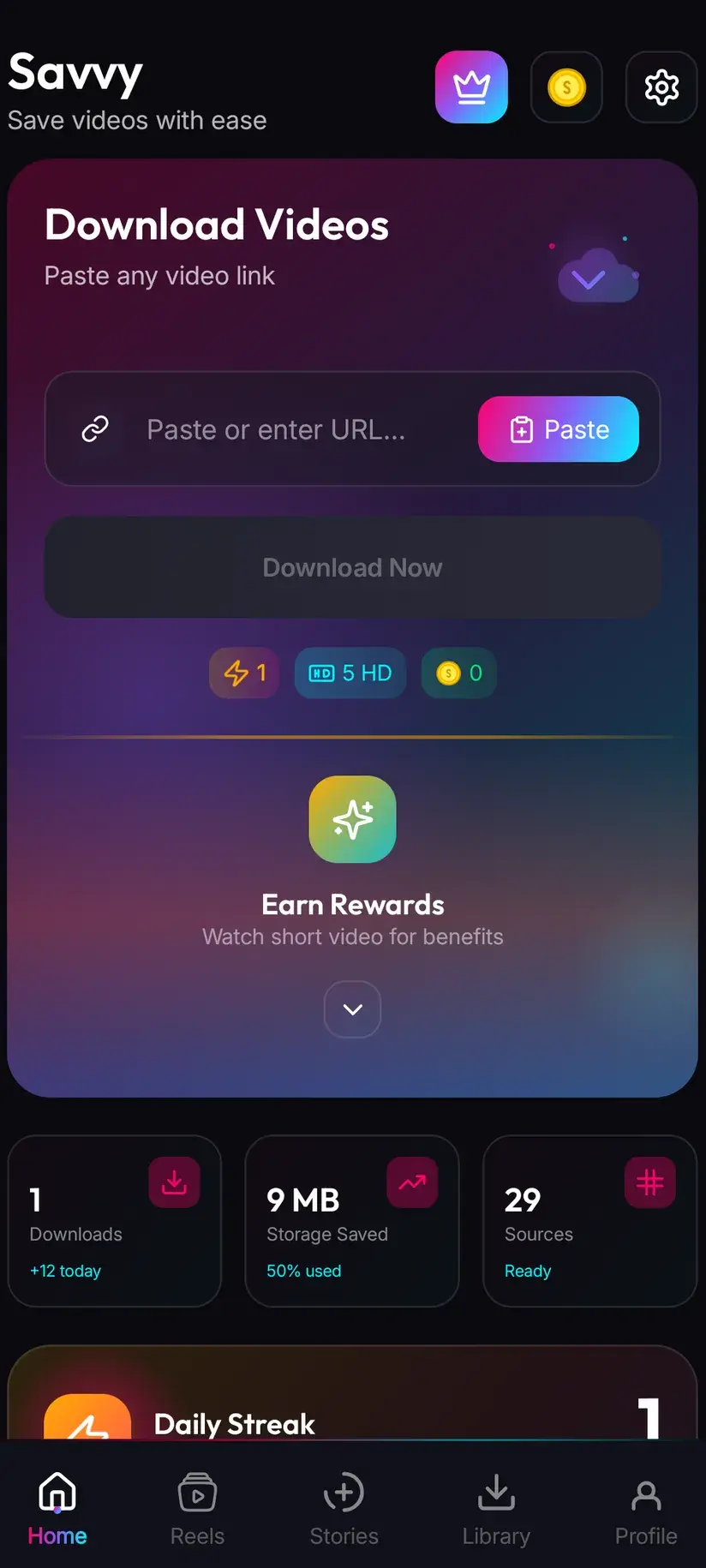
The quick one is the share sheet. On the video, open Dailymotion's share control and choose Savvy from the list of apps. The link is handed straight over and the download starts by itself — Savvy fills its own link field and fires off the request without waiting for you to press anything. You do not see the home screen and you do not touch the clipboard.
The other route is copy-and-paste, which is what you use when the link is already sitting somewhere else: in a message, a note, a browser address bar. Copy it, open Savvy, tap the Paste button next to the link field, then tap Download. That middle step deserves stating plainly, because plenty of downloader apps imply something else: Savvy does not read your clipboard in the background, and switching to the app does not silently start anything. Paste is an ordinary button. It reads the clipboard once, drops what it finds into the field, and stops there.
Dailymotion is a browser-first platform for a lot of people, which is why the paste route matters more here than it does on an app-only network. A link out of Chrome's address bar behaves exactly like one out of the Dailymotion app.
- Share to Savvy — link filled and download started automatically
- Copy link, then Paste — tap Paste to fill the field, then tap Download yourself
- A dai.ly short link works as well as a full dailymotion.com one — Savvy recognises the shortener by name
- Links from m.dailymotion.com and the geo-routed geo.dailymotion.com are recognised too, so you do not need to tidy a URL up before pasting it
Which Dailymotion links actually resolve
This is where most failed downloads start, and it is almost never the app's fault. A Dailymotion URL has to point at one video for there to be anything to fetch.
The shape that works contains /video/ — a single watch page with an id after it. The embed form, /embed/video/, points at the same thing and works too, which is handy if you copied the link out of a page that had the player dropped into it rather than off Dailymotion itself. A dai.ly short link is the same watch page wearing a shorter coat.
What does not work is anything that is a *list* of videos. A channel or creator page, a playlist, a topic page, a search result — none of these is a video, so there is no file behind them to save. The frustrating part is that Savvy will accept them into the link field without complaint. Platform recognition works on the domain, not the path, so anything on dailymotion.com is recognised as Dailymotion; the path only ever nudges a confidence score. The refusal comes later, when extraction runs and comes back with nothing.
So if a link fails immediately and you are sure the video plays fine, look at what you actually copied before you look at anything else. Nine times in ten it is a channel URL grabbed from the header rather than the video's own link.
- Works — a watch page containing /video/, or the embed form /embed/video/
- Works — a dai.ly short link, and the m. or geo. subdomains
- Does not work — channel, playlist, topic and search pages: they are lists, not videos
- Does not work — a video that has been removed, or one restricted in your region: Savvy sees the same refusal your browser would
Open the link in a browser first if you are unsure. If a single video starts playing without you clicking anything further, that is the link you want. If you land on a grid of thumbnails, tap through to the one you mean and copy again from there.
Four routes in, one spinner
A downloader reads the page a video sits on, finds the media URL the player is using, and fetches that file. Nothing is decrypted and nothing is broken into — it is the same file your browser would stream, saved instead of played.
The reason this is not a solved problem once and for all is that pages change. Dailymotion reshapes its markup and its internal endpoints from time to time, and an extraction technique that worked last month can quietly return an empty response today. Savvy's answer is not to depend on one technique: a Dailymotion link is tried against four extraction providers in priority order, and if the first comes back empty the next is tried automatically. You see one spinner, not four attempts.
Four is decent coverage. It is not the deepest chain in the app — Instagram has five and TikTok more — but it is well clear of the platforms carried by a single provider, and it is the practical reason Dailymotion feels reliable in a way some smaller platforms do not.
It also explains the shape of a failure. Each provider gets its own time limit before the chain moves on, and the whole fetch has a hard ceiling of well under two minutes, so a link cannot hang forever. When you do get an error, the entire chain has already been exhausted — every route tried, every route empty. Tapping Download again straight away simply repeats the same four failures. Waiting and returning to the same link later genuinely does help, because the providers behind the chain change over time even when the link does not.
- Four providers, tried in priority order, with automatic fall-through
- Each provider has its own timeout — a slow one holds up the chain briefly, not indefinitely
- An error message means all four came back empty, not that one attempt went wrong
- Retrying instantly rarely changes anything; retrying tomorrow often does
Quality: pick from what the video actually has
Once a link resolves, Savvy lists the qualities that particular video is genuinely available in and lets you choose. That list is not a menu of aspirations — it is read from what Dailymotion is serving.
Standard definition, up to 480p, is free. It comes out of a daily allowance rather than any balance, so ordinary everyday saving costs nothing at all. Above 480p you spend coins, Savvy's in-app currency.
Dailymotion hosts a wide spread of material, and the spread shows up in the quality list. A professionally produced upload from a broadcaster or a music label will often offer a full ladder up to Full HD. A clip someone re-uploaded from a phone years ago may top out at 360p, and no amount of paying will change that: downloading cannot add detail that was never uploaded. Before spending coins on a higher tier, read the list. If the top option offered is 480p, that is the ceiling for that video and no app can lift it.
- SD video, up to 480p — free, from your daily allowance
- HD and Full HD video — 10 coins, or one HD credit if you have one
- 2K video — 15 coins
- 4K video — 20 coins
- Images and audio — 5 coins
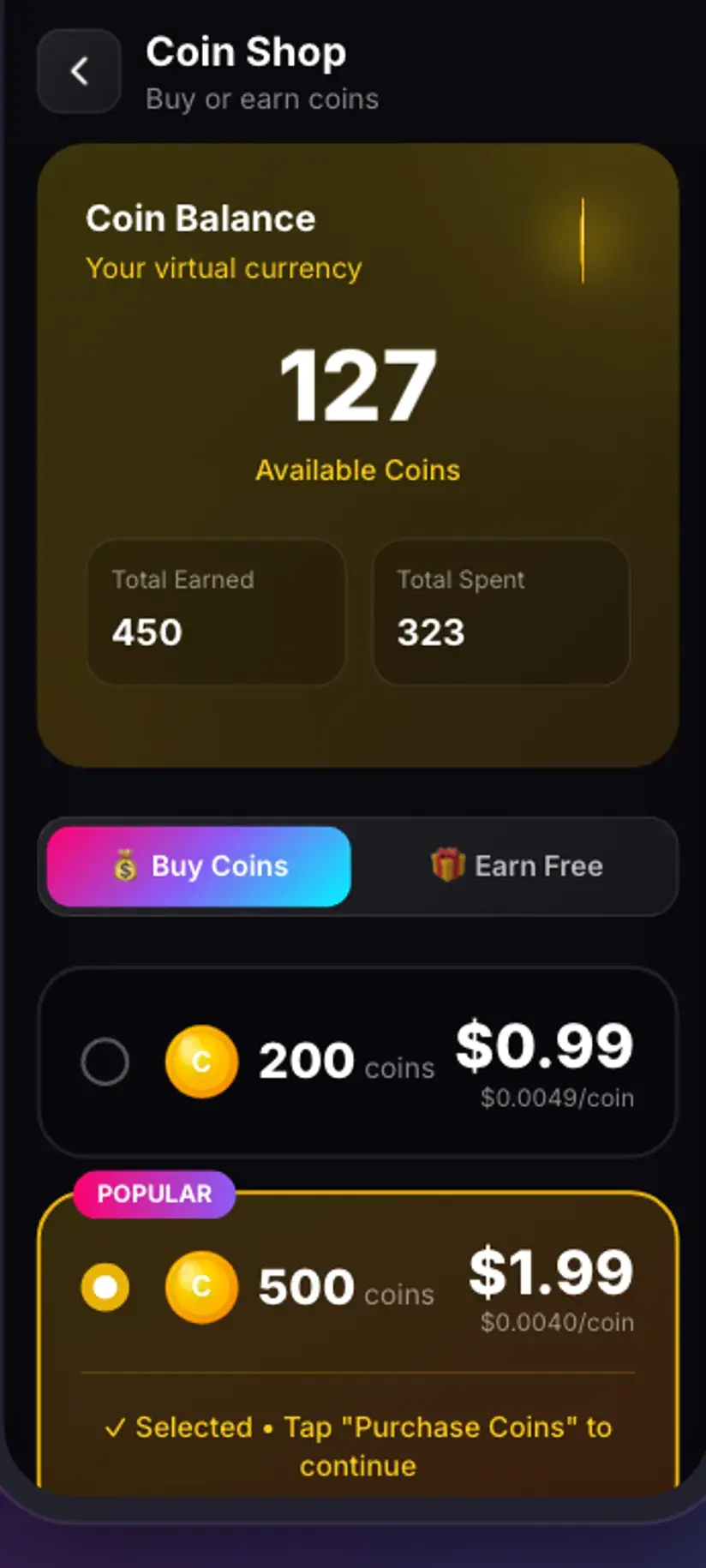
Coins are earned as well as bought: watching a short rewarded ad or checking in daily both top up the balance, and the Coin Shop lists those routes alongside the packs. A Premium subscription is the other way out — it removes ads and lifts the download limits, so the coin arithmetic stops applying. The free tier is ad-supported through Unity Ads, which collects your device's advertising ID; that is set out in the Savvy privacy policy.
Watermarks: what travels with the file and what does not
Savvy does not add a watermark of its own. Nothing is stamped onto a file on the way through.
Dailymotion does not burn a platform watermark into videos the way some short-video networks do. What you may still see is whatever the uploader put there themselves — a channel logo in a corner, a broadcaster's bug, an intro card, a watermark from whichever platform the clip was originally made for before it was re-uploaded here. All of those are pixels in the frame. They were baked into the video before it was ever published, and they are not metadata a downloader can switch off.
This is worth being blunt about because a fair number of apps advertise otherwise. Removing a burned-in mark means cropping and re-encoding the picture, which costs you quality at the edges and is a video-editing job, not a download setting.
There is exactly one platform in Savvy where a genuinely unstamped source can be requested, and it is TikTok — a handful of TikTok-specialist providers support it. That is a TikTok-only behaviour. It does not extend to Dailymotion or to any other platform, and no guide here will pretend it does.
Where the file lands, and what you may keep
A finished download goes to your device's Downloads folder, inside a Savvy directory sorted into a subfolder per platform — so a Dailymotion video ends up in Downloads / Savvy / Dailymotion. From that point it is an ordinary MP4: it shows in your gallery, plays in any video app, and can be moved or shared like any other file.
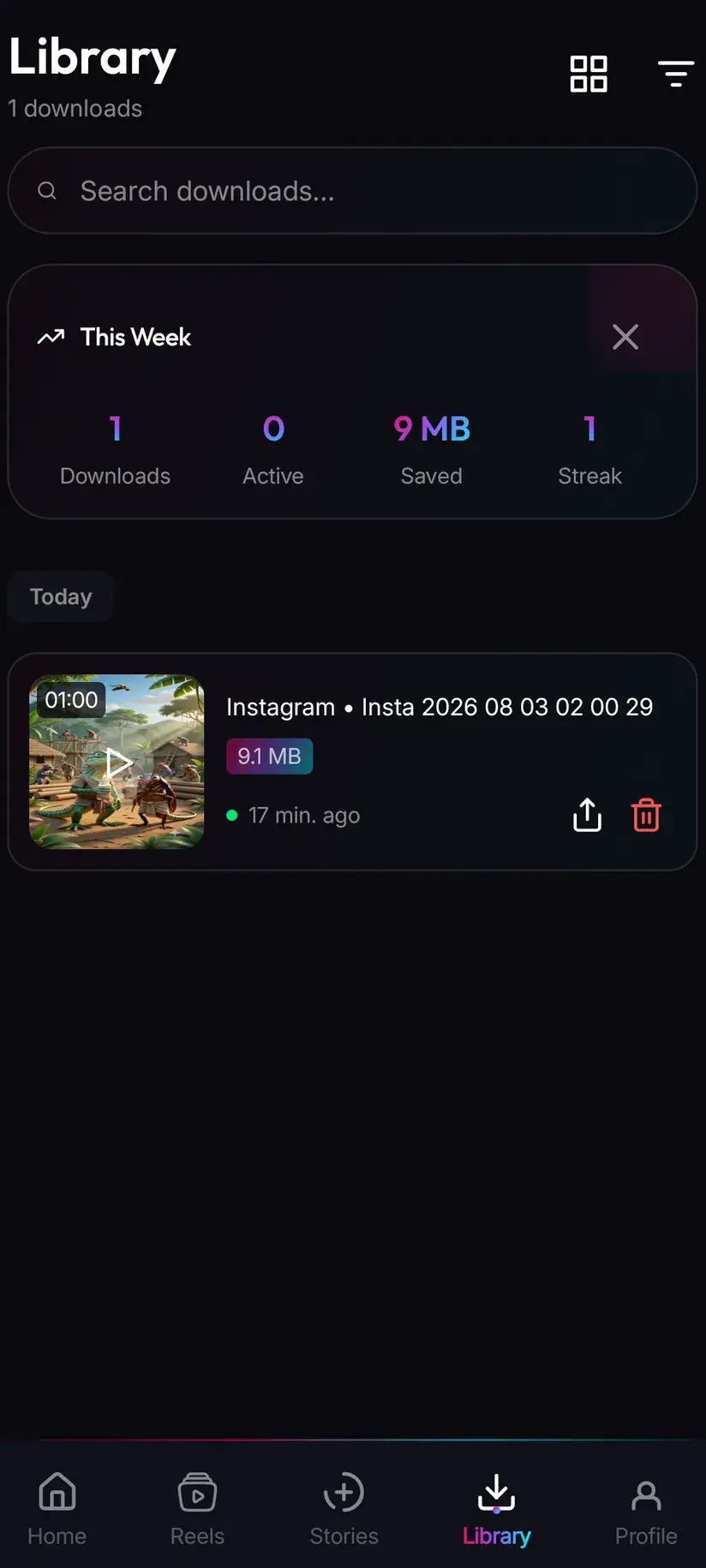
Inside the app, Library is the faster way back to it. Everything you have saved is listed there with search and filters, which beats scrolling a gallery once you have a few dozen files. Storage is its companion — it shows what each download is costing you in space and lets you clear several at once, which matters more than people expect after a run of Full HD saves.
The harder question is not where the file goes but whether you should have it. Dailymotion carries a great deal of professionally produced material — broadcast clips, music, films — and rights to that content sit with whoever made it, not with whoever uploaded it. Saving something to watch on a flight is a very different act from re-uploading it or putting it behind your own branding, and the platform's own terms have things to say about the second. If a video is restricted where you are, that restriction is a decision made at Dailymotion's end; a downloader reads the same page your browser reads and gets the same answer.
Downloading something is not the same as holding rights to it. Personal offline viewing sits in very different territory from redistribution or monetisation. Is downloading videos legal? sets out where the line usually falls — worth reading once before it becomes a habit.
Procedure
How to download a Dailymotion video
A minute for the first one. No Dailymotion account is needed for a public video, and no Savvy account is needed at all.
Install Savvy and allow storage access
Install Savvy from Google Play and open it. Grant the storage permission when it is asked for — that is what lets a finished file be written somewhere your gallery can see, rather than staying locked inside the app.
Open the video on Dailymotion
Find the video in the Dailymotion app or in a browser and play it once. You are confirming two things: that it is the right clip, and that it plays for you without a region block or a removal notice.
Send the link to Savvy
Use Dailymotion's share control and pick Savvy from the list of apps. The link is handed over and the download starts on its own. If Savvy is not offered in the share sheet, copy the link instead and carry on with the next step.
If you copied instead, tap Paste and then Download
Open Savvy and tap the Paste button beside the link field. That fills the field with what you copied — it does not start anything. Check the link contains /video/ or is a dai.ly short link rather than pointing at a channel or a playlist, then tap Download.
Choose a quality from the list offered
Savvy shows the resolutions that video genuinely exists in. SD up to 480p is free from your daily allowance; HD and above spend coins. Pick the highest option actually listed rather than assuming a bigger one is hiding somewhere.
Let it finish, then find it in Library
Progress shows in the app. When it completes the file is in Downloads/Savvy/Dailymotion on your device, and listed under Library inside the app where search and filters make it easy to find later.
Frequently asked questions
- How do I download a Dailymotion video to my phone?
- The quickest route is Dailymotion's own share control: open it on the video and pick Savvy. The link is handed over and the download starts by itself — nothing to type. If Savvy is not in the share sheet, copy the video's link instead, open Savvy, tap the Paste button to fill the link field, then tap Download. Paste only fills the field; it does not start the download on its own.
- Does a dai.ly short link work?
- Yes. Savvy recognises dai.ly as Dailymotion's own shortener, so a dai.ly link behaves exactly like the full dailymotion.com watch page it points at. The m.dailymotion.com and geo.dailymotion.com forms are recognised too, which means you do not have to tidy a URL up before pasting it. What matters is that the link points at one video rather than at a channel or a playlist.
- Is downloading Dailymotion videos free?
- Standard definition, up to 480p, is free — it comes from a daily allowance rather than any balance, so everyday saving costs nothing. Above 480p you spend coins: 10 for HD or Full HD (or one HD credit), 15 for 2K, 20 for 4K, and 5 for an image or an audio-only file. Coins can be earned free by watching a short rewarded ad or checking in daily, or bought in packs. Premium removes the ads and lifts the limits instead.
- Can I download Dailymotion videos in HD?
- Where the video exists in HD, yes. After the link resolves, Savvy lists the resolutions that particular upload is actually available in, and HD or Full HD costs 10 coins or one HD credit. The caveat matters more than the price: Dailymotion carries everything from broadcast-quality uploads to old phone clips, and downloading cannot add detail that was never uploaded. If the top option offered is 480p, that is the ceiling for that video.
- Will the downloaded video have a watermark?
- Savvy does not add one. Dailymotion does not burn a platform watermark into videos the way some short-video networks do, so most saves come out clean. What can still appear is anything the uploader baked in themselves — a channel logo, a broadcaster's bug, or a watermark from whichever platform the clip was originally made for. Those are pixels in the frame, not a setting; removing them means cropping and re-encoding, which costs picture quality.
- Why does a Dailymotion link sometimes fail?
- Most often because the link is not a video. Savvy recognises any dailymotion.com address by its domain, so a channel, playlist or search URL is accepted into the field and only fails later, when extraction finds no single file behind it. Copy from the video's own watch page instead. If the link is definitely a video, the failure means all four extraction providers came back empty — usually a temporary change at Dailymotion's end. Retrying immediately repeats the same four failures; waiting and trying later often works.
- Do I need a Dailymotion account?
- Not for a public video. If the link plays in a signed-out browser, Savvy can read it with no Dailymotion account and no sign-in of any kind. You also do not need a Savvy account — pasting or sharing a link and downloading works without signing up for anything. Content that is private, age-gated behind a login, or blocked in your region is a different matter: a downloader reads the same page your browser reads and receives the same refusal.
- Where do downloaded Dailymotion videos save?
- In your device's Downloads folder, under a Savvy directory sorted by platform — so Dailymotion videos land in Downloads/Savvy/Dailymotion. From there it is an ordinary MP4 that appears in your gallery and plays in any video app. Inside Savvy, the Library screen lists everything you have saved with search and filters, and the Storage screen shows what each file takes up so you can clear several at once.