Should I screen record a video or download it?
Screen recording is the reflex, and it is the only one of the two methods that changes the video — it films your screen rather than copying the file, and everything it loses is lost at that moment.
- Guide
- Comparison
- Read
- 15 min
- Language
- English
Steps checked against the Savvy Android app on
Devikon Research Team
These are not two versions of the same thing
The comparison is usually framed as two ways of saving a video. They are not. They are two entirely different operations that happen to leave a file on your phone.
Downloading copies a file that already exists. The video sits on the platform's servers as an encoded file; a download fetches those exact bytes and writes them to storage. Nothing is decoded, nothing is re-drawn, nothing is re-encoded. What you end up with is a duplicate of what the platform holds — no better, and crucially no worse.
Screen recording makes a new video of your screen. Your phone decodes the stream, draws it, composites the interface on top, and a recorder captures that composited output frame by frame and encodes it into a fresh file. The result is a video of a video. Every step in that chain is an opportunity to lose something, and several of them take the opportunity.
The name for this in video work is generation loss: each decode-and-re-encode cycle discards a little more, and the losses do not undo. A screen recording is a second-generation copy at best. If the clip was already compressed by the platform on upload — and it was — your recording is the third generation of something that started out sharp.
- Download — the platform's own file, byte for byte. Same picture, same audio track, same duration
- Screen recording — a new encode of what your display showed, including everything else on the display
- Generation loss — every re-encode discards more detail, and none of it comes back
- Time — a download takes as long as your connection needs. A recording takes exactly as long as the video
Where the picture quality actually goes
Four separate mechanisms degrade a screen recording, and they compound rather than overlap.
The screen is the ceiling, not the source. A recorder captures the display buffer, so the recording can be no more detailed than what your screen was showing. Play a 4K video on a 1080p phone panel and the best possible recording is 1080p — the extra detail was discarded before the pixels ever reached the display. Worse, many recorders capture at a lower resolution again to keep up.
The recorder has its own bitrate budget, and it is usually modest, because it has to encode in real time on a phone that is also decoding video, driving a display and running an app. Real-time encoding is a compromise by nature: it cannot look ahead, cannot spend extra effort on a difficult scene, and cannot go back. Offline encoders can do all three, which is part of why the platform's own file looks better at a smaller size.
Frames get dropped. When the device is busy — a notification arriving, a thermal throttle, another app waking up — the recorder misses frames. You see it as a stutter that was not in the original, and no amount of playback smoothing puts them back.
Scaling and colour drift. The video is scaled to fit the player, sometimes scaled again by the recorder, and pushed through the display pipeline with whatever colour handling your device applies. Small shifts in tone and sharpness accumulate quietly and are extremely hard to reverse afterwards.
Set against that, the download side is simple: you get what the platform serves. That is not a promise of high quality — platforms compress hard, and 1080p vs 4K covers why a high tier is often missing entirely — but it is the best version of that video that exists to be had. A recording starts from that same file and then subtracts.
A slow connection makes a recording much worse than people realise. If the player drops to a lower rendition mid-playback to keep buffering under control, you are filming that lower rendition — and unlike streaming, where the quality recovers, your recording keeps the bad stretch permanently. Recording while buffering is the single most common cause of a recording that looks far worse than the video did.
Everything else that ends up in the frame
Quality loss is measurable. The interface problem is the one people actually notice when they watch the file back.
A screen recording captures the screen, which means it captures all of it: the status bar with your battery percentage and the time, the notch or camera cutout, the like and comment counts, the caption, the follow button, the progress bar, the creator's handle, the scrubber that appeared when you touched the screen. Videos that autoplay in a feed bring the next post sliding in at the end. Tapping to pause leaves a pause icon in the frame.
Then there are the interruptions. A notification banner drops in over the picture. A call arrives and the recording ends. The screen dims part way through because the auto-lock timer does not know you are doing anything. Somebody messages you and their name is now in your video permanently.
You can crop the interface out afterwards, and this is where the two problems meet: cropping means throwing away part of the frame and then scaling what is left back up, which costs resolution on top of everything the recording already cost. Cropping a status bar off the top is cheap. Cropping a full set of overlay controls out of the middle of a vertical video is not.
One thing recording definitively does not do is remove a watermark. A platform badge burned into the video is part of the picture, so it gets filmed like everything else — and now it has interface elements around it. What is a watermark explains why nothing downstream can subtract it.
- Status bar, notch, clock, battery — in every frame unless you crop them out
- Player controls and engagement counts — often over the middle of the picture, which is the expensive place to crop
- Notifications and calls — arriving unannounced, and ending the recording in the second case
- Screen dimming and auto-lock — a gradual fade nobody spots until playback
- The watermark — still there. Recording adds interface, it does not remove pixels
The audio problem, which is worse than the picture one
This is the part that catches people out, because you cannot see it while you are doing it.
A downloaded file keeps the video's own audio track, intact and separate from the picture. That matters more than it sounds: the track can be extracted, replaced, level-adjusted, or muted independently in an edit, because it is a distinct stream inside the container.
A screen recording captures a single mixed stream of whatever the device was outputting. There is no separation to recover. Every notification chime, keyboard click and system sound that played during the recording is now permanently part of the audio, at whatever level it happened to play. So is the volume you were listening at, in some capture paths. And if anything else was making noise — a second app, a call tone — it is in there too.
It gets worse on devices where system audio capture is restricted. On those, a recorder falls back to the microphone, which means you are recording the room: the video's sound coming out of a small speaker, plus the air conditioning, plus you shifting in your chair, plus the acoustics of wherever you are. That is not a copy of the audio, it is a field recording of a phone.
And on some content, capture is blocked deliberately. Apps with protected media set a secure flag on their window, and the result is a black rectangle with silence, or silence over a picture. That is not a bug to work around — it is the platform stating its position on being recorded, which is a question about rights rather than about tooling. Is downloading videos legal? sets out where those lines sit.
The recording method makes no difference to the rights position. Filming somebody else's video off your own screen produces a copy exactly as downloading it does, and the copyright analysis is the same in both cases. Screen recording is not a loophole — it is just a lossier way of arriving at the same file.
Time, storage and battery
The costs that are not about quality are easy to overlook and add up faster.
A recording runs in real time. A twelve-minute video takes twelve minutes to capture, during which you cannot use the phone for anything else without it appearing in the file. A download takes as long as the transfer takes, and it runs in the background while you do something else.
Encoding costs battery and generates heat, because the phone is decoding and encoding video simultaneously for the whole duration. On a warm day, or on an older device, thermal throttling then starts dropping frames — which is the quality problem and the battery problem arriving as one.
The files are often larger for a worse picture. A real-time encoder cannot make the clever, considered decisions an offline encoder makes, so it compensates with data. It is entirely normal for a screen recording to be bigger than the original file while looking noticeably softer.
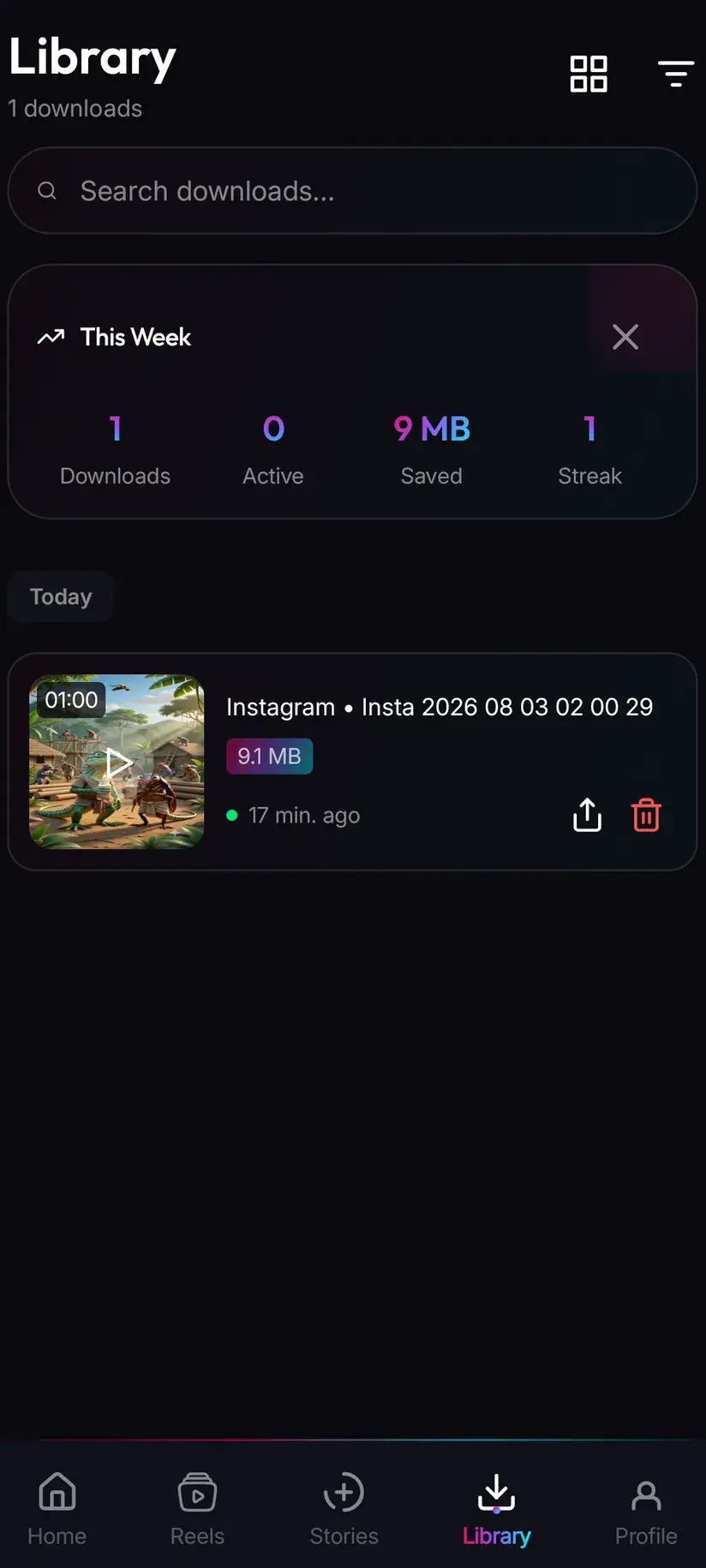
There is also an organisational cost that only shows up later. Recordings land in the camera roll among your photos, named by timestamp, with no indication of what they are or where they came from — which is how people end up scrolling a gallery looking for a clip they saved a month ago. Downloads in Savvy land in the Downloads folder under a Savvy directory sorted by platform, and Library indexes them with search and filters. The Storage screen shows what each is taking up and clears several at once.
When screen recording is genuinely the right tool
It has real uses, and dismissing it entirely would be as unhelpful as pretending it is free.
The strongest case is content that is not a media file at all. If what you want to keep is a flow through an app, a game session, a bug you are reporting to support, a settings screen you want to remember, or a demonstration of how something behaves, there is no file anywhere to download — the thing you are capturing only exists as it happens. Recording is not a compromise there, it is the correct tool.
The second case is something live and unrepeatable. A stream in progress has no finished file to fetch until it ends, and sometimes not then either.
The third is when the interface is the point. If you are showing somebody what a post looked like, complete with the caption, the comments and the account it came from, the surrounding chrome is the information rather than the contamination. Screenshots and recordings of a screen carry context that a bare video file loses.
And the honest fourth: when a link simply will not resolve and you have the right to keep the content anyway. Platforms restructure their pages and extraction breaks, and how downloaders work explains why that happens and why waiting usually fixes it. But if you need it now, a lossy copy that exists beats a perfect one that does not.
What recording is not is a way around a restriction. If content is behind a private account, a paywall or a protected player, capture blocking and the rights position both point the same way, and the answer is the same as it is everywhere else in this cluster: this is for content you already have the right to keep.
- An app flow, a game, a bug report — no file exists to download. Record it
- A live broadcast in progress — nothing to fetch until it is over
- Showing context — captions, comments and the account, where the interface is the information
- A broken link and a real deadline — a lossy copy now beats waiting, if the content is yours to keep
- Anything gated or protected — not a case for recording. Capture is often blocked, and the rights question does not change with the method
Getting the best out of whichever you use
If you are downloading, most of the decision is the quality tier, and the default that disappoints least is the free one. SD up to 480p costs nothing — it comes from a daily allowance rather than a balance — and on a phone screen it is genuinely fine. Step up when there is a reason: HD or Full HD for something you will rewatch or cast to a television, 2K or 4K only if you are going to crop or stabilise it in an edit and the source actually offers those tiers.
If you are recording, a few minutes of preparation is worth more than any amount of fixing afterwards:
- Turn on do-not-disturb before you start. It removes the single most common ruin of a recording
- Let the video buffer fully first, and confirm the player has settled at its highest quality rather than a fallback rendition
- Set your recorder to its highest resolution and bitrate in its own settings — the defaults are usually conservative
- Play full-screen and wait for the controls to fade before you begin capturing
- Extend the auto-lock timer so the screen does not dim mid-clip
- Close what you can — a phone with less to do drops fewer frames
- Trim rather than crop where you have the choice. Trimming the ends costs nothing; cropping the frame costs resolution
Coins are earned as well as bought, so the paid tiers are not necessarily a purchase: a short rewarded ad or a daily check-in adds to your balance, and the Coin Shop lists both alongside the packs. HD and Full HD are 10 coins or one HD credit, 2K is 15, 4K is 20, and an image or audio-only file is 5. A Premium subscription removes the ads and lifts the limits instead.
Procedure
How to choose between downloading and screen recording
Try the link first — it takes seconds, and it is the only route that leaves the video unchanged. Record only when it fails or does not apply.
Send the link across before anything else
In the source app, tap share, choose Share to… and pick Savvy. The link is handed over and the download starts on its own. If Savvy is not in the share sheet, choose Copy link, open Savvy, tap the Paste button to fill the field, then tap Download yourself.
Pick a quality that matches what you will do with it
Savvy lists the tiers that video is actually available in. SD up to 480p is free from your daily allowance and looks fine on a phone. Choose HD or above only for a larger screen or an edit, and only if the picker genuinely offers it.
If the link will not resolve, wait before switching methods
A failure usually means the platform changed something, and the extraction chain for that platform already came back empty — so retrying immediately repeats the same result. Coming back to the same link later often works. If the content is private, deleted or paywalled, it will not resolve at all, and recording is not the answer to that either.
Decide whether recording is actually appropriate
Recording suits things with no file behind them: an app flow, a game, a live broadcast, a bug report, or a capture where the interface and comments are the point. It does not suit getting around a restriction, and protected players commonly block capture outright.
Prepare the phone before you record
Turn on do-not-disturb, extend the auto-lock timer, close what you are not using, and set your recorder to its highest resolution and bitrate. Let the video buffer fully so you are not capturing a fallback rendition.
Play it full-screen and start clean
Wait for the player controls to fade out, then begin recording a second before the video starts and stop a second after it ends. Those spare seconds are what let you trim without clipping the content.
Trim, and resist cropping
Cut the dead ends off, which costs nothing. Cropping out interface elements costs part of the frame and then costs sharpness again when you scale back up, so accept a status bar rather than losing a quarter of the picture to remove it.
Frequently asked questions
- Is screen recording lower quality than downloading?
- Yes, and by a wider margin than most people expect. Downloading copies the platform's own file byte for byte, so the picture is unchanged. Screen recording decodes that video, draws it, composites the interface on top and encodes the whole thing again in real time — a second generation at best, and a third if you count the compression the platform applied on upload. The recording is also capped by your screen rather than by the source, so a 4K video on a 1080p panel can never be recorded above 1080p.
- Does a screen recording capture the video's audio?
- It captures a single mixed stream of whatever the device was outputting, which is not the same thing. Notification chimes, system sounds and anything else playing are baked in permanently, and there is no separate audio track to extract or replace afterwards. On devices where system audio capture is restricted, the recorder falls back to the microphone, so you get the video's sound through a small speaker plus the room around you. A download keeps the original audio track intact and separable.
- Why does my screen recording look blurry or choppy?
- Usually one of four things. The player dropped to a lower rendition while buffering and you filmed that. Your recorder's own bitrate is set low, which is the common default. The phone dropped frames because it was busy or running hot while decoding and encoding at once. Or the video was scaled to fit the player and then scaled again by the recorder. Buffering is the most frequent single cause, so let a clip load fully before you start.
- Does a screen recording take up more storage than a download?
- Often yes, while looking worse. A real-time encoder cannot look ahead or spend extra effort on a difficult scene the way an offline encoder can, so it compensates with data. That is how a recording ends up larger than the original file and visibly softer at the same time. Recordings also land in the camera roll named by timestamp, whereas downloads in Savvy go to a Savvy folder sorted by platform, indexed in Library with search and filters and totalled up on the Storage screen.
- Will screen recording remove the watermark?
- No. A platform watermark is composited into the frames of the video itself, so it is part of the picture your screen is showing and it gets filmed along with everything else. You then add interface elements on top of it — a status bar, player controls, engagement counts. Screen recording is the one method that reliably adds more to the frame than it removes.
- Is screen recording a video legal when downloading it is not?
- The method does not change the answer. Filming somebody else's video off your own screen produces a copy just as downloading it does, and the copyright analysis is the same for both. What matters is whose work it is, whether you can already access it, and above all what you do with the copy afterwards. Note also that protected players commonly block capture deliberately, producing a black frame or silence — that is a statement of position rather than a technical fault.
- When is screen recording the better option?
- When there is no file to download. An app flow, a game session, a bug you are reporting, a live broadcast still in progress, or a capture where the caption, comments and account are the point all exist only as they happen. Recording is the correct tool there rather than a compromise. It is also a reasonable fallback when a link genuinely will not resolve and you have the right to keep the content — a lossy copy that exists beats a perfect one that does not.
- Can I just crop the interface out of a screen recording?
- You can, and it costs you. Cropping throws away part of the frame, and scaling what is left back up to the original dimensions costs sharpness on top of everything the recording already cost. Trimming the beginning and end is free by comparison. If the overlay sits across the middle of a vertical video, cropping it out can take a startling proportion of the picture — usually more than the status bar was worth.