How do I download Instagram highlights?
A highlight is not a new kind of post — it is a story the owner decided to keep, which explains both what saving one requires and the one way it is easier than saving a live story.
- Guide
- How-to
- Read
- 13 min
- Language
- English
Steps checked against the Savvy Android app on
Devikon Research Team
A highlight is a story that did not expire
Everything about highlights follows from one fact, so it is worth stating before anything else. A highlight is an archived story. When someone pins a story to their profile under a named cover, nothing new is created — Instagram simply stops the clock on a story that would otherwise have vanished, and files it under a label.
That has two consequences pulling in opposite directions, and both matter.
The awkward one: a highlight is served the same way a story is served. It is not a feed post with a public address that anyone can fetch signed out, and it never becomes one by being pinned. Which means the requirement that surprises people about stories applies here too, unchanged.
The good one: the twenty-four-hour deadline is gone. A live story is a race — spot it, decide, save it, or lose it. A highlight has no clock at all, so for the first time in this cluster you have the luxury of doing the setup properly before you need it. Nothing about the mechanism rewards hurrying.
One qualifier on that. No expiry is not the same as permanent. A highlight lasts exactly as long as its owner wants it to, and people prune highlights constantly — reorganising a profile, retiring an old collection, removing something after second thoughts. The clock is not ticking, but the decision is somebody else's.
- Live story — visible for 24 hours from posting, then genuinely gone
- Highlight — the same story, pinned under a cover, with the clock stopped
- Feed post — a different thing entirely, with a public link and no account requirement
- A highlight lasts until its owner removes it, which they may do at any time
The sign-in is the same sign-in, for the same reason
If you have already connected your Instagram account to Savvy for stories, you are done — there is no second connection for highlights and nothing further to set up. If you have not, this is the part to read.
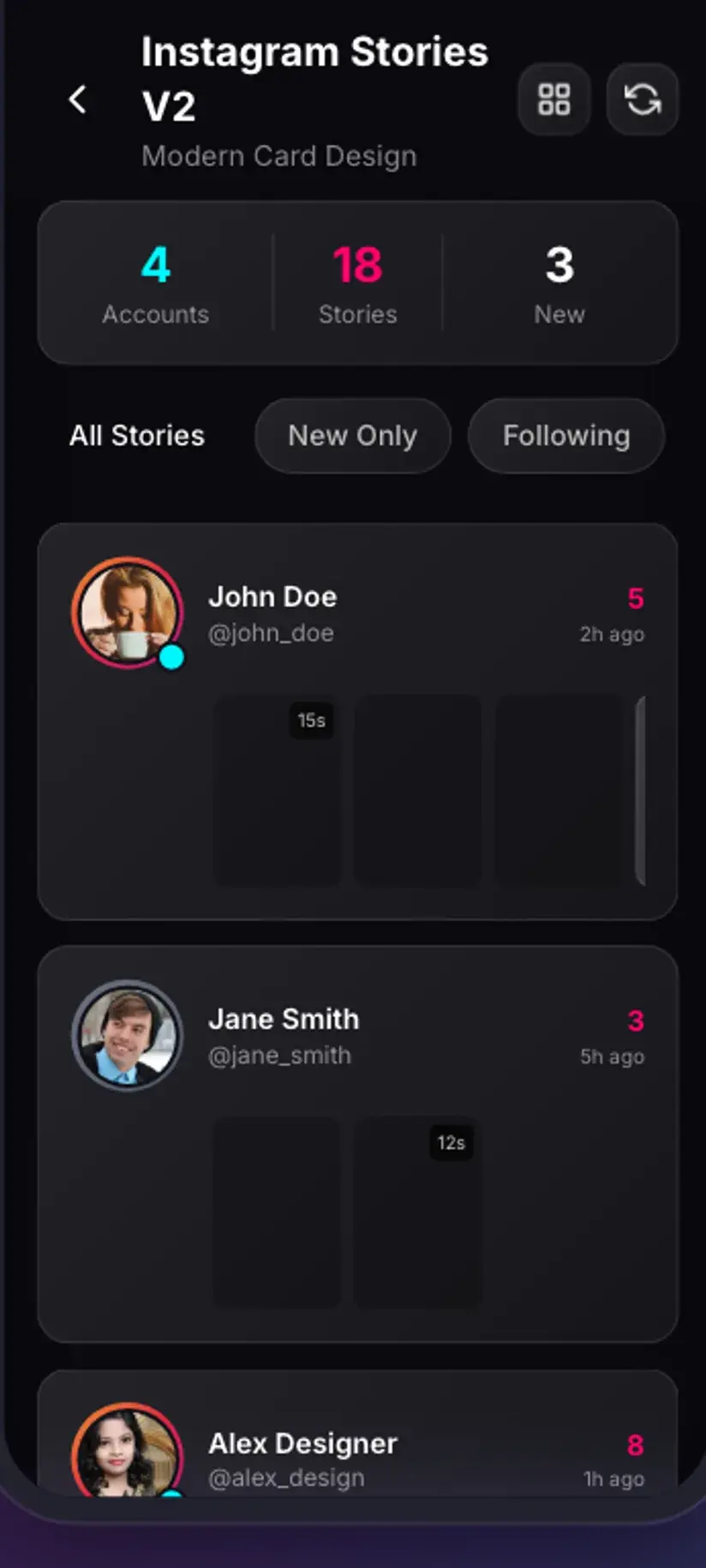
Instagram serves story content, live or archived, to a signed-in account rather than to the open web. There is no public permalink to hand a downloader the way there is for a reel, so the whole paste-a-link approach has nothing to work with. Savvy's answer is to hold a session of your own: in the Stories area, on the Instagram tab, Connect opens Instagram's own login page inside the app. You sign in there, including any two-factor step, and what Savvy keeps afterwards is the session that produced — the cookies, the user agent and the request headers. Those three are what make a later request look like your account asking rather than an anonymous one, and they are sent on every subsequent fetch.
It is a session, so it behaves like one. Instagram expires sessions on its own schedule, and changing your password or signing out elsewhere ends one immediately. When that happens the Instagram tab stops loading and asks you to connect again, which is routine rather than a fault. A Log out control on the same screen clears it deliberately.
The full version of this — what the connection captures, why WhatsApp statuses need nothing like it, and what happens when it lapses — is in downloading Instagram stories. Nothing there changes for highlights.
Connecting an account is a real step and worth a moment's thought rather than a reflex tap: do it only in an app you intend to keep, and never on a shared device. What is kept and how is set out in the Savvy privacy policy. The free tier is ad-supported through Unity Ads, which collects your device's advertising ID.
The routes, ranked honestly
This is where most pages on the subject start inventing things, so here is the realistic order, best first.
Catch it while it is live. Almost every highlight was a live story before it was pinned, and the live tray is what the Instagram tab in Savvy lists once you are connected. If you follow an account whose highlights you tend to want — a shop's product runs, a friend's travel, a craftsperson's process — saving from the tray as things are posted gets you the item at its best and with the least friction. This is not a workaround; it is the flow the screen is built around, and it is the reason connecting the account in advance pays off.
Try the highlight link. A highlight address contains /stories/, which Savvy recognises, so pasting one into the link field is accepted and handed to the extraction chain. Whether anything comes back is a different question — highlights are account-gated at Instagram's end, so an extractor may well have nothing to return. It costs one attempt and nothing else. If it comes back empty, that is the source, not a setting you have missed.
Your own highlights are a different problem. If the collection is yours, you posted every item in it, so the best copies are the originals in your gallery. Instagram also keeps your past stories in its own Archive, and its account data export includes your media. For your own material, those beat any downloader by a wide margin.
What is not on the list, in case a search result suggested otherwise: there is no route to the highlights of an account you cannot already see. A private profile stays private, and a downloader receives the same refusal your browser would.
- Best — save from the live tray as stories are posted, before they become highlights
- Worth one try — paste the highlight link; recognised, but account gating may leave nothing to return
- For your own — your gallery originals and Instagram's own Archive beat any download
- Not possible — anything from an account your own account cannot already see
Quality: a highlight is exactly as old as the story inside it
Pinning a story does not refresh it. Whatever Instagram stored on the day it was posted is what a highlight still contains, which makes highlights the one place on Instagram where you can watch compression standards change over time.
So a highlight added last week looks like a current story. One pinned four years ago looks like a four-year-old story — softer, smaller, encoded to the standards of the phones and networks of the day. That is not something a downloader can improve, and it is not a sign that anything went wrong. There is no higher-resolution copy behind it waiting to be requested.
Stories in general sit at the modest end regardless of age. They are built for a phone screen and a short life, so they are compressed harder than feed posts and come with no quality picker — Instagram serves one size and that is what you get.
The cover image is worth a separate word, because people ask about it. A highlight cover is a small crop the owner chose for a circle on a profile grid. It is interface furniture rather than one of the stories, and it is stored at avatar-like sizes. If it is the picture you want rather than the collection, the same advice applies as for a profile picture: look for the post it came from. Instagram DP download covers why.
Savvy adds no watermark of its own. What travels with a saved highlight is whatever the poster burned into the frame at the time — text, stickers, GIFs, a handle. Those are pixels in the picture rather than a layer, so no download setting removes them.
What it costs
A story-class item, live or archived, costs 5 coins — the same flat rate as any image or audio download in Savvy. There is no per-size pricing here because there are no sizes to choose between.
If your balance is short, Savvy does not simply refuse. It offers a short rewarded ad in place of the coins, which is a genuine route to saving something without any balance at all. Premium removes the arrangement entirely: story and highlight saves cost nothing and no post-download interstitial appears.
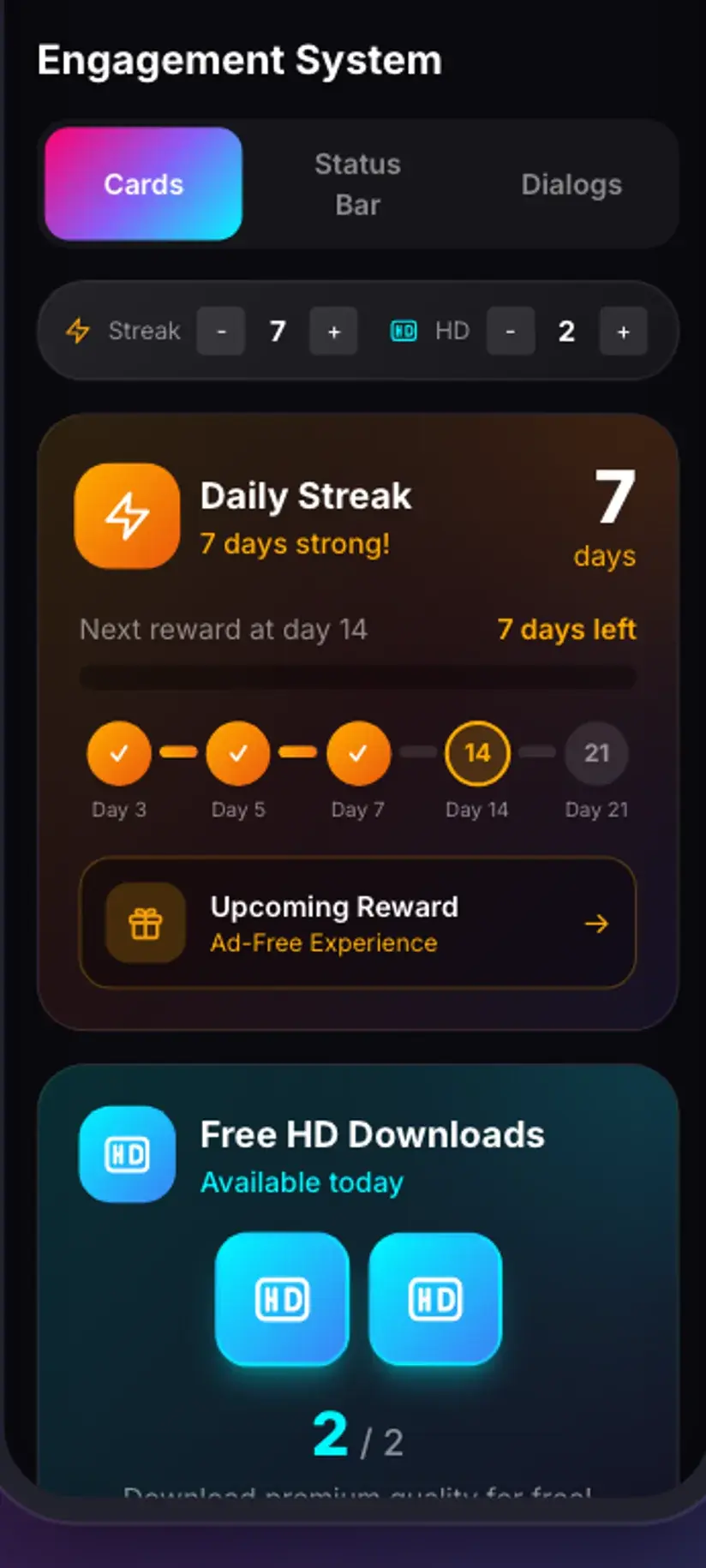
Highlights are where this arithmetic becomes worth planning around, because a highlight collection is a set rather than a single item. Twenty items at 5 coins each is a hundred coins, and unlike a live story there is no deadline forcing you into it today. Build a balance up through the daily check-in first — it costs nothing but opening the app — and then work through the collection in one sitting.
- 5 coins per item, flat, the same as any image
- Short of coins? A rewarded ad is offered in their place
- Premium removes the cost and the interstitial
- No clock means you can build a balance first — use the daily check-in
Permission matters more here, not less
It would be easy to assume that because a highlight is pinned publicly on a profile, it is fair game in a way a disappearing story is not. That is worth resisting.
A highlight is still a story. It was usually posted casually, in the moment, to an audience the poster had in mind at the time — and pinning it was a decision to keep it on *their* profile, on *their* terms, revocable whenever they choose. People unpin highlights precisely because they have changed their mind. A saved copy in your gallery does not honour that change of mind, and that is the whole ethical distinction.
The unremarkable uses are unremarkable: keeping your own highlights, saving something a friend asked you to keep, holding a shop's product clip you were told you could reuse, or archiving material you have permission to use. The uses that cause harm are equally familiar — reposting someone's material as your own, using a personal clip commercially, or redistributing something the person has since removed.
Nothing here is designed to hide you from anyone either. Savvy is not an anonymous viewer and makes no such claim. If you would hesitate to open a highlight normally, a downloader does not change the calculation.
Downloading something and being entitled to keep or republish it are separate questions, and archived personal content is where they diverge most sharply — the poster can revoke a highlight, but not a copy you already hold. Is downloading videos legal? sets out where the line usually falls.
Where saved items land, and what to check when nothing loads
Anything saved from Instagram is written to your device's Downloads folder, in a Savvy directory, under the Instagram subfolder — so Downloads / Savvy / Instagram. From there each item is an ordinary file: it appears in your gallery, plays or opens anywhere, and can be shared onward.
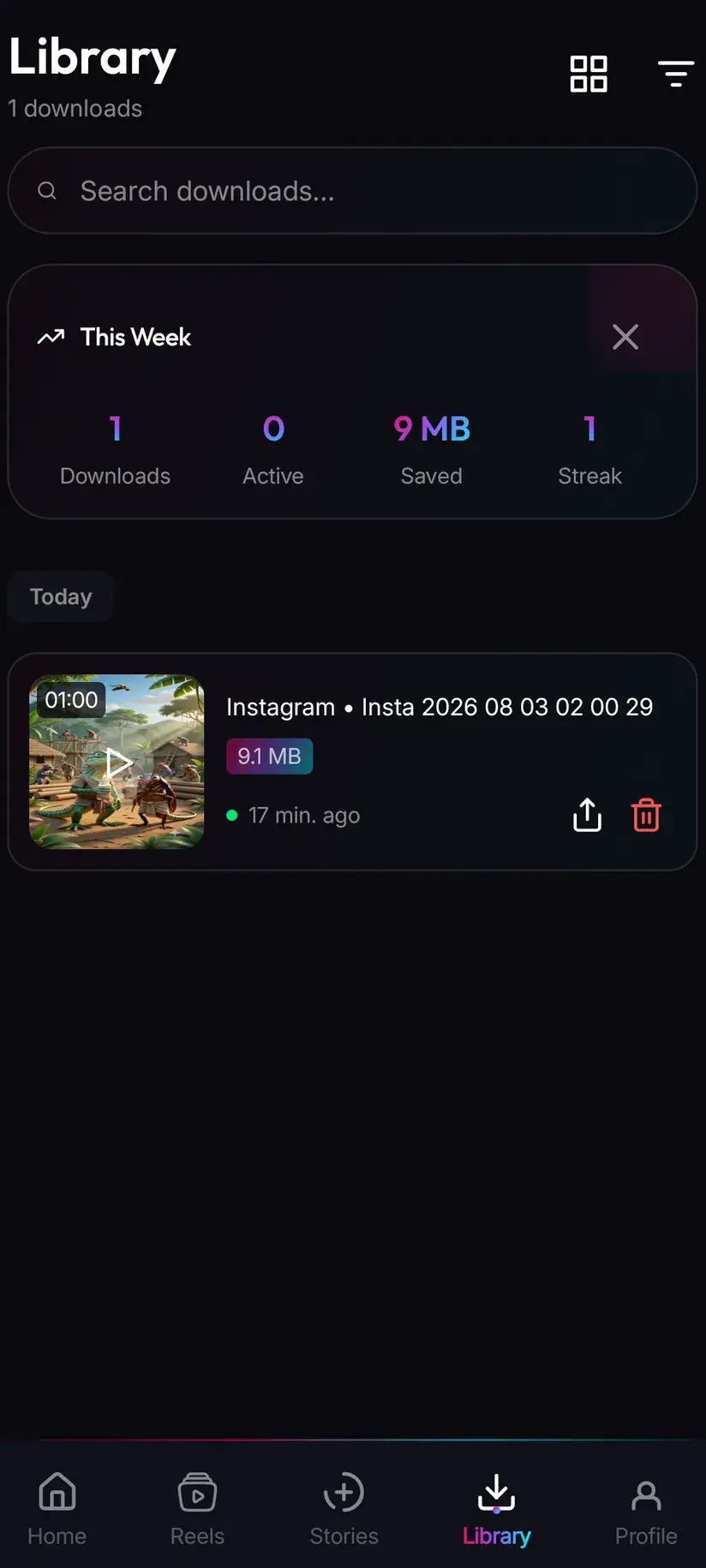
Library inside the app is the faster route back, with search and filters across everything you have saved — which matters more with highlights than with anything else, because you tend to save a set at a time rather than one item. Storage shows what each download is taking up and lets you clear several at once.
If the Instagram tab shows nothing at all, work through it in order. Refresh first: the tray is fetched rather than kept, and a stale screen is the commonest cause. If it still does not load, the connection has probably lapsed — reconnect, which takes a moment and is entirely routine. And if the tray loads but a particular account is missing from it, that account simply has no live story at the moment; a tray lists live stories, so an account with only highlights will not appear there.
- Files land in Downloads / Savvy / Instagram and behave like any other file
- Library and Storage are the app-side routes back to them
- Nothing loading? Refresh first, reconnect second
- An account with only highlights and no live story will not show in the tray
Procedure
How to save Instagram highlights
There is no deadline here, so do it in the sensible order: connect the account first, build a small coin balance, then work through what you want in one sitting.
Install Savvy and allow storage access
Install Savvy from Google Play and open it, granting the storage permission when it is asked for. That is what lets a saved item be written where your gallery can see it rather than staying inside the app.
Connect your Instagram account once
Open the Stories area, switch to the Instagram tab and tap Connect. Instagram's own login page opens inside the app; sign in there, completing any two-factor step. Savvy keeps the resulting session — cookies, user agent and headers — so later requests are made as your account. If you already did this for stories, it covers highlights too.
Build a balance before you start
Each item costs 5 coins, and a highlight collection is a set rather than a single save. The daily check-in and short rewarded ads both add to your balance for free. Premium removes the cost altogether if you save regularly.
Save from the live tray where you can
The Instagram tab lists accounts with an active story. Since almost every highlight was a live story first, saving from the tray as things are posted is the most reliable route and gets the item at its best.
Try the highlight link for anything already archived
Copy the highlight address and paste it into the link field on the home screen, then tap Download. The link is recognised and handed to the extraction chain — but highlights are account-gated at Instagram's end, so an empty result is a real possibility rather than a mistake on your part.
Use your own originals for your own collections
If the highlights are yours, you posted every item in them. The originals in your gallery, Instagram's own Archive and its account data export all beat any download for your own material.
Check Library afterwards
Saved items land in Downloads/Savvy/Instagram and are listed under Library inside the app, where search and filters make a set saved in one sitting easy to find again later.
Frequently asked questions
- How do I download Instagram highlights?
- Highlights are archived stories, so they need the same in-app Instagram connection stories do — there is no public link a downloader can simply fetch. Connect your account once on the Instagram tab in Savvy's Stories area, signing in on Instagram's own page inside the app. After that the most reliable route is saving from the live story tray, since almost every highlight was a live story first. Pasting a highlight link is worth one attempt but may return nothing.
- Do highlights need the same Instagram login as stories?
- Yes, exactly the same one, and there is no second connection to set up. Instagram serves story content — live or archived — to a signed-in account rather than to the open web, which is why neither can be fetched from a public address. Savvy handles it by opening Instagram's own login page inside the app and keeping the resulting session: cookies, user agent and headers, sent on every later request. If you connected for stories, highlights are already covered.
- Do Instagram highlights expire after 24 hours?
- No, and that is the main practical difference from a live story. Pinning a story to a highlight stops the 24-hour clock, so the item stays on the profile indefinitely. What it is not is permanent: a highlight lasts exactly as long as its owner wants, and people prune and reorganise highlights regularly. There is no deadline forcing you to hurry, but the decision to keep it belongs to somebody else.
- Can I download highlights without logging in?
- No. This is the point that catches people who arrive from a reel guide expecting to paste a link — highlights are account-gated at Instagram's end, so there is nothing for an anonymous request to fetch. It is not a limitation a better app has solved; it is how Instagram serves story content. Reels and ordinary feed posts do have public links and need no account at all, which is why the two flows look so different.
- Why are old highlights such poor quality?
- Because pinning a story does not refresh it. A highlight still contains exactly what Instagram stored on the day the story was posted, so one pinned four years ago is a four-year-old story — encoded to the standards of the phones and networks of the time. Stories sit at the modest end regardless of age, since they are built for a phone screen and a short life. There is no higher-resolution copy behind them, and no downloader can produce one.
- How much does saving a highlight cost?
- Each item is 5 coins, the same flat rate as any image or audio download, with no size options to choose between. If your balance is short, Savvy offers a short rewarded ad in place of the coins rather than refusing. Premium removes the cost and the post-download interstitial entirely. Since a collection is a set rather than one item, it is worth building a balance through the daily check-in first — nothing is expiring while you do.
- Can I save someone's highlight cover image?
- A cover is not one of the stories. It is a small crop the owner chose for a circle on their profile grid, stored at sizes closer to a profile picture than to a photograph, and it is interface furniture rather than content. If the cover picture is what you actually want, look for the post it was cropped from and save that instead — the reasoning is the same as for profile pictures, which the Instagram DP guide covers.
- Where do saved highlights go on my phone?
- Into your device's Downloads folder, under a Savvy directory sorted by platform — so Downloads/Savvy/Instagram. Each item is an ordinary file from there: it appears in your gallery and opens anywhere. Inside Savvy, Library lists everything with search and filters, which matters with highlights because you tend to save a set at a time, and Storage shows what each item is taking up so you can clear several at once.