Banglarbhumi registration: how to get the account you need
Banglarbhumi will not hand over a record until you are signed in. Registering is free and quick — the mobile number is the part that decides whether it stays usable.
- Guide
- Getting started
- Read
- 9 min
- Language
- English · বাংলা
Portal steps checked against banglarbhumi.gov.in on
Devikon Research Team
Start here: you do need an account
Plenty of published advice says otherwise — including, until we corrected it, this page. So let us be exact: a banglarbhumi.gov.in account is required before the portal will give you a land record. Khatian details, plot details, case status: the sign-in comes first.
The wrong version spread so widely because the portal fails late rather than early. Signed out, you can open the lookup screens and the District, Block and Mouza dropdowns will populate one after another exactly as they should. Everything responds; nothing warns you. It is only when you ask for the record itself that the portal replies with its login page instead of a result. Working dropdowns feel like access, and they are not access.
So if you arrived wondering whether registering is worth the bother, the answer is that it is the only route in. The better news is that it is free, takes a few minutes, and one registration covers the whole portal — everything below runs off the same account:
- Know Your Property — search by District, Block and Mouza, then by Khatian number or Plot (Dag) number
- RS-LR Plot Information — plot details across RS and LR records
- Mutation Case Status — where a Dakhil Kharij application has reached
- Conversion Case Status — track a land-conversion application
- Mouza Information — mouza-level details
- Query Search — look up a query you already have a reference for
- Public Grievance — raising a grievance with the department
Register before you need it rather than in the middle of a task. The OTP step is where sign-ups stall, and discovering that while you are mid-search — with a Khatian number typed in and a CAPTCHA solved — is how people lose an afternoon.
What an account is actually for
The account does two jobs, and it is worth keeping them apart. It makes record lookups return something instead of redirecting you to sign-in — which is what most people are here for. And it wakes up the transactional menus under Citizen Services, which stay inert behind the message “Please Login and then click Citizen Services” until you are in.
The transactional side is also where charges begin, so the account and the fee are two separate gates rather than one:
- Online Application — Mutation Application, Conversion Application, Warish Application, Land Revenue(Khajna) Application, Mobile Number update Against Khatian, Fees Payment
- Service Delivery — ROR Request, Plot Info. Request, Plot Map Request, Mouza Map Request, Signed ROR/PI/PLM Copy(s), No Due Certificate
- Online Service Status — Mutation Status, Conversion Status, Warish Status, Mutation Plot Khatian Status, Payment Status of Land Revenue (Khajna), Application No. Recovery ( Khajna )
- eChallan Application — eChallan Generation. GRN Search, Mouza Map Availability Details, Application/Report Reprint, RS-LR Information, Land Classification and the Online Fees Calculator are direct Citizen Services entries, not part of this submenu
The pattern is consistent: reading a record needs the account but no fee; obtaining a signed or certified copy of it, or changing it, needs the account and generally a fee on top.
The mobile number is the most important field on the form
If you take one thing from this page after the section above, take this. The mobile number you register with is not a contact detail — it is the key to the account, and getting it wrong is close to unrecoverable from your sofa.
It carries three jobs at once. It receives the OTP at registration, and it anchors recovery — password reset and Application No. Recovery both depend on it. And it is the anchor for recovery — password reset, and services like Application No. Recovery ( Khajna ) that verify against the registered number.
So the number must be one you personally hold, that is active, and that you expect to keep. Registering with a shop's number, an agent's number, or a relative's handset is the most common way people end up permanently locked out of an account that is nominally theirs. When that number stops being reachable, no amount of retrying will produce an OTP.
Have the phone physically in hand and unlocked before you begin. The OTP window is short, and going to find the handset mid-form is enough to have to start over.
What registration asks for
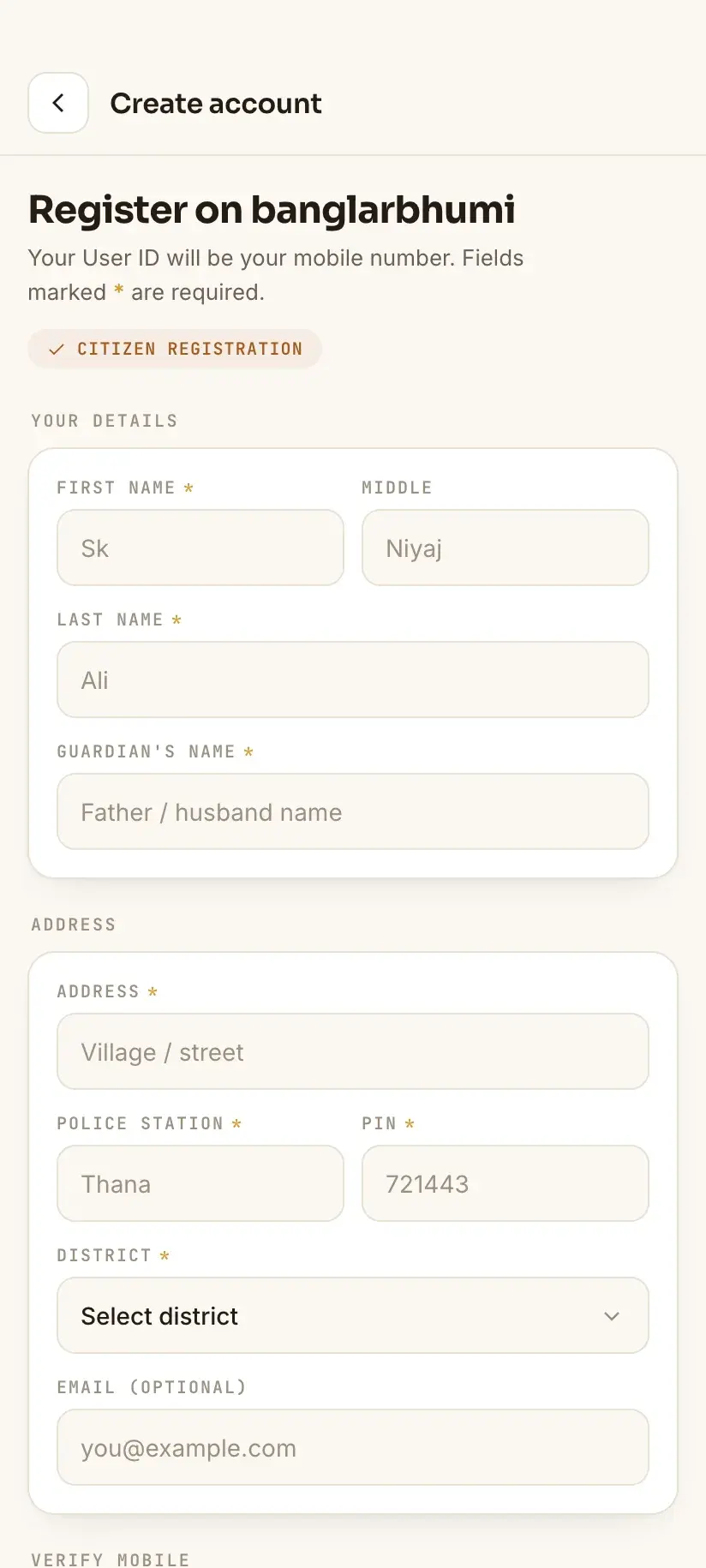
Registration is on the portal's SIGN UP control, in the header beside SIGN IN. The form is short and asks for ordinary account details rather than land documents — you are creating a user, not filing anything about a plot.
Expect to provide, broadly: your name, a mobile number, an email address, a chosen user ID and password, address details, and a CAPTCHA. The mobile number is then verified by OTP. Exact fields shift as the portal is updated, so treat this as the shape rather than a checklist.
One thing it is not: registration does not attach a Khatian to your account. The account is a login, nothing more — it does not assert that you own anything, and each application separately identifies whatever holding it concerns. Having an account is what lets you *search* the records; it says nothing about whose name is in them.
- Enter your name as you would want it to appear on an application, and be consistent across services.
- Use an email address you can actually open — some reset routes go there rather than to SMS.
- Choose a user ID you can reproduce exactly. It is case-sensitive at sign-in.
- Keep the password somewhere retrievable. Reset depends on the registered mobile or email working.
Why registration fails, and what each failure means
Sign-up failures cluster into a handful of causes, and the portal's error messages rarely distinguish between them.
- The OTP doesn't arrive. Wait several minutes before requesting another — on many portals a fresh request invalidates the previous code, so repeated tapping can leave you with nothing usable. Turn off SMS-filtering apps, check the blocked or spam folder, and confirm the handset's message storage isn't full.
- The CAPTCHA keeps failing. Refresh it rather than guessing at an ambiguous character. Some screens report a wrong CAPTCHA as a different error entirely, which sends people off fixing the wrong thing.
- “User already exists”. Someone — often an agent or a relative who once helped — may have registered against your number or email already. Try password recovery on that identifier before creating anything new.
- The page hangs or errors before you can submit. That is portal availability, not your details. Try again at a quieter time; there is nothing to fix on your side.
- Auto-capitalisation. Mobile keyboards capitalise the first character of an empty field, which quietly changes a user ID or email you thought you typed correctly. Check it character by character before submitting.
If the OTP still doesn't arrive after attempts spread across a day, the problem is the number, not the timing — either it isn't reachable, or it's already tied to an existing account.
After registering — and where the portal can't help
Once the account exists, signing in needs the user ID, the password and the CAPTCHA. If sign-in itself becomes the problem, that has its own set of causes and fixes worth reading separately.
If your mobile number changes later, the portal carries Mobile Number update Against Khatian under Online Application — but note it sits *behind* the login, so it only helps while you can still get in. If you are already locked out because the old number is gone, the route is your local BL&LRO office, not the website.
And an account solves none of the substantive problems. If the record shows the wrong name or area, if an inheritance was never recorded, or if ownership is contested, registering changes nothing — those go to the BL&LRO office, and where a dispute or money is involved, to an advocate. We are not able to advise on any of that.
One app note, ours: Bhumir Tathya is an unofficial Android app we build at Devikon — free and bilingual, presenting the portal's lookups as native screens. It signs in with your own banglarbhumi.gov.in account, so it needs you to have one: it does not create accounts for you, and no third-party app bypasses government authentication. It also keeps records you have already opened readable offline, though a saved copy shows the record as it stood when you viewed it and should be re-checked on the portal before you rely on it.
Procedure
How to register on Banglarbhumi
A few minutes, and the account then covers every service on the portal. Have the phone you're registering with unlocked and beside you before you start.
Do this before you start searching, not during
The portal lets you fill in a whole search while signed out and only redirects you to login at the final step, so anything you typed is lost. Register first, then search.
Open SIGN UP
Go to banglarbhumi.gov.in and choose **SIGN UP** from the header, beside SIGN IN. Use the বাংলা/English toggle if you'd rather read the form in Bengali.
Enter your details
Fill in your name, mobile number, email, address, and a user ID and password. Type the user ID and email manually — mobile keyboards auto-capitalise the first character and that alone will break your later sign-in.
Use a mobile number you will keep
This number receives the registration OTP, every sign-in OTP afterwards, and anchors password recovery. Don't use an agent's or a shop's number; when it stops being reachable the account effectively stops being yours.
Complete the CAPTCHA
Enter it exactly as shown, and refresh rather than guess if a character is ambiguous. A failed CAPTCHA is often reported as some other error.
Verify the OTP
Submit and wait for the SMS. Give it several minutes before requesting a new one — a fresh request may invalidate the code already on its way.
Sign in and check the menus
Sign in with the new account. Citizen Services should now open Online Application, Service Delivery, Online Service Status and eChallan instead of showing “Please Login and then click Citizen Services”.
Frequently asked questions
- Do I need to register on Banglarbhumi to check my Khatian?
- Yes. The portal will not return a record until you are signed in. It is easy to believe otherwise, because **Know Your Property** opens signed out and the District, Block and Mouza dropdowns populate normally — the redirect to the login page only happens at the final step, when you request the record. Registering is free. The same account also covers applications, payments and document requests such as an ROR or a Mouza Map, which carry fees on top.
- How do I create a Banglarbhumi account?
- Go to banglarbhumi.gov.in and choose **SIGN UP** in the header. Fill in your name, mobile number, email, address and a user ID and password, complete the CAPTCHA, and verify the OTP sent to your mobile. The form asks for ordinary account details — you do not need any land document to register, and registering does not attach a Khatian to the account.
- Which mobile number should I register with on Banglarbhumi?
- One you personally hold, that is active, and that you expect to keep. It receives the registration OTP, every sign-in OTP afterwards, and it anchors password recovery and services like Application No. Recovery ( Khajna ). Registering with an agent's or a shop's number is the most common route to being permanently locked out of your own account.
- Why is my Banglarbhumi registration OTP not coming?
- Wait several minutes rather than re-requesting — a new request can invalidate the code already sent. Turn off any SMS-filtering app, check the blocked and spam folders, and make sure the handset's message storage isn't full. If nothing arrives across repeated attempts over a day, the number is either unreachable or already registered to an existing account; try password recovery on it before creating a new one.
- Banglarbhumi says my user already exists. What now?
- Your mobile number or email is probably already tied to an account — often one an agent or relative created while helping you. Use the password recovery route on that identifier rather than registering again with different details, because a second account will not have access to anything the first one applied for.
- Can I change the mobile number on my Banglarbhumi account?
- The portal has **Mobile Number update Against Khatian** under Citizen Services → Online Application, but it requires you to be signed in. If you are already locked out because the old number is no longer reachable, that route is closed and you will need to visit your local BL&LRO office instead.
In Bengali
বাংলারভূমি রেজিস্ট্রেশন — বাংলায়
পশ্চিমবঙ্গের বাংলারভূমি পোর্টাল থেকে খতিয়ান, দাগ বা মিউটেশনের তথ্য পেতে হলে **অ্যাকাউন্ট খুলে লগইন করতেই হবে**। রেজিস্ট্রেশন বিনামূল্যে, কয়েক মিনিটের কাজ — আর একটি অ্যাকাউন্টেই পোর্টালের সব পরিষেবা চলে।
- খতিয়ান দেখতে কি বাংলারভূমিতে রেজিস্ট্রেশন লাগে?
- হ্যাঁ। লগইন না করলে পোর্টাল রেকর্ড দেখায় না। ভুল বোঝার কারণ হল, ‘Know Your Property’ পাতাটি লগইন ছাড়াই খোলে এবং জেলা, ব্লক ও মৌজার তালিকাও ঠিকঠাক আসে — শেষ ধাপে রেকর্ড চাইলে তবেই লগইন পাতা আসে। রেজিস্ট্রেশনে টাকা লাগে না। একই অ্যাকাউন্ট দিয়ে আবেদন, টাকা জমা ও ROR/মৌজা ম্যাপের অনুরোধও করা যায়, তবে সেগুলিতে ফি লাগে।
- বাংলারভূমিতে অ্যাকাউন্ট কীভাবে খুলব?
- পোর্টালের উপরের দিকে **SIGN UP**-এ ক্লিক করুন। নাম, মোবাইল নম্বর, ইমেল, ঠিকানা এবং ইউজার আইডি ও পাসওয়ার্ড দিন, CAPTCHA পূরণ করুন, তারপর মোবাইলে আসা OTP দিয়ে যাচাই করুন। কোনও জমির কাগজ লাগে না।
- কোন মোবাইল নম্বর দিয়ে রেজিস্টার করা উচিত?
- যে নম্বরটি **আপনার নিজের** এবং চালু থাকবে, সেটিই দিন। রেজিস্ট্রেশনের OTP, প্রতিবার লগইনের OTP এবং পাসওয়ার্ড রিকভারি — সবই এই নম্বরে আসে। দোকান বা দালালের নম্বর দিয়ে রেজিস্টার করলে পরে অ্যাকাউন্টে ঢোকা প্রায় অসম্ভব হয়ে যায়।